Table of Content

Introduction
In the last decade, online shopping has transformed from a convenient alternative to an everyday norm, and the rise of mobile commerce has taken it even further. According to recent industry reports, nearly 59% of global consumers prefer shopping through mobile devices, a number that continues to climb each year. This growing preference signals a shift in consumer behavior—people want instant access to products, quick checkout options, and personalized shopping experiences, all without leaving their smartphones.
Table of Content
For businesses, this isn’t just a passing trend; it’s a fundamental change in how commerce works. A dedicated mobile app isn’t just a “nice-to-have” anymore—it’s a growth engine. Companies that make eCommerce apps or invest in eCommerce app development are seeing higher conversion rates, better customer retention, and stronger brand loyalty compared to those relying solely on websites. A well-built app offers speed, personalization, and convenience that a mobile site often can’t match.
If you’re looking to create an eCommerce app for your business, this guide will walk you through every step, from the initial planning stages to post-launch optimization. You’ll learn how to define your goals, choose the right technology stack, design an engaging user experience, and calculate realistic costs. By the end, you’ll have a clear roadmap to build an eCommerce app that not only works flawlessly but also delivers a memorable shopping experience for your customers.
What is Mobile eCommerce?
Mobile eCommerce, or mCommerce, is the next evolution of online shopping, where consumers use smartphones and tablets to browse, buy, and manage their purchases anytime, anywhere. Whether it’s ordering groceries from an app, grabbing the latest fashion deal via a push notification, or booking tickets in just a few taps, mobile eCommerce makes shopping fast, personal, and always within reach.
Unlike traditional eCommerce that’s designed primarily for desktops, mCommerce is optimized for small screens, quick navigation, and mobile payment options like Apple Pay, Google Pay, and UPI. It often happens through:
- Mobile-optimized websites that adjust seamlessly to any device.
- Dedicated mobile apps offering a richer, more personalized shopping experience.
Why is it so important? Mobile devices already account for over 70% of global eCommerce sales projections for 2025. That means if your store isn’t delivering a smooth mobile experience, you’re potentially missing out on the majority of your customers.
From AI-powered recommendations to instant checkout and location-based offers, mobile eCommerce is shaping how brands connect with consumers in real time—and how shoppers expect to interact with brands in 2025 and beyond.
Why Build an eCommerce App?
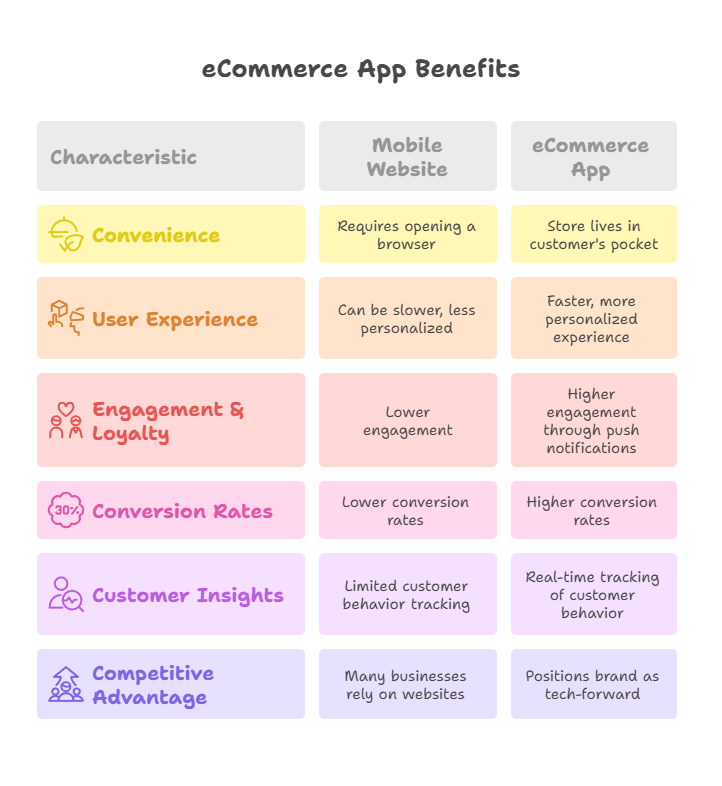
In today’s hyper-connected world, having an eCommerce website is no longer enough. Consumers now expect a fast, personalized, and on-the-go shopping experience—and that’s exactly what a dedicated eCommerce app delivers.
Here are the top reasons why businesses are investing in eCommerce app development in 2025:
1. Unmatched Convenience for Customers
With a mobile app, your store lives right in your customer’s pocket. Shoppers can browse products, track orders, and make purchases anytime—no need to open a browser or type in a web address.
2. Better User Experience (UX)
Apps are built for speed and simplicity. Features like personalized recommendations, saved payment details, and one-tap checkout drastically reduce buying friction.
3. Increased Engagement and Loyalty
Push notifications, exclusive app-only deals, and loyalty programs keep customers coming back. In fact, research shows that mobile app users are more likely to make repeat purchases compared to web-only users.
4. Higher Conversion Rates
A well-optimized eCommerce app typically has 2x higher conversion rates than mobile websites. Faster load times, smoother navigation, and secure in-app payments all play a role.
5. Valuable Customer Insights
Mobile apps allow you to track customer behavior, purchase patterns, and preferences in real time. These insights help you improve your marketing strategies and product offerings.
6. Competitive Advantage
Many small and medium-sized businesses still rely only on websites. Launching an app positions your brand as tech-forward and customer-focused, giving you an edge in the market.
Step 1 – Planning & Research
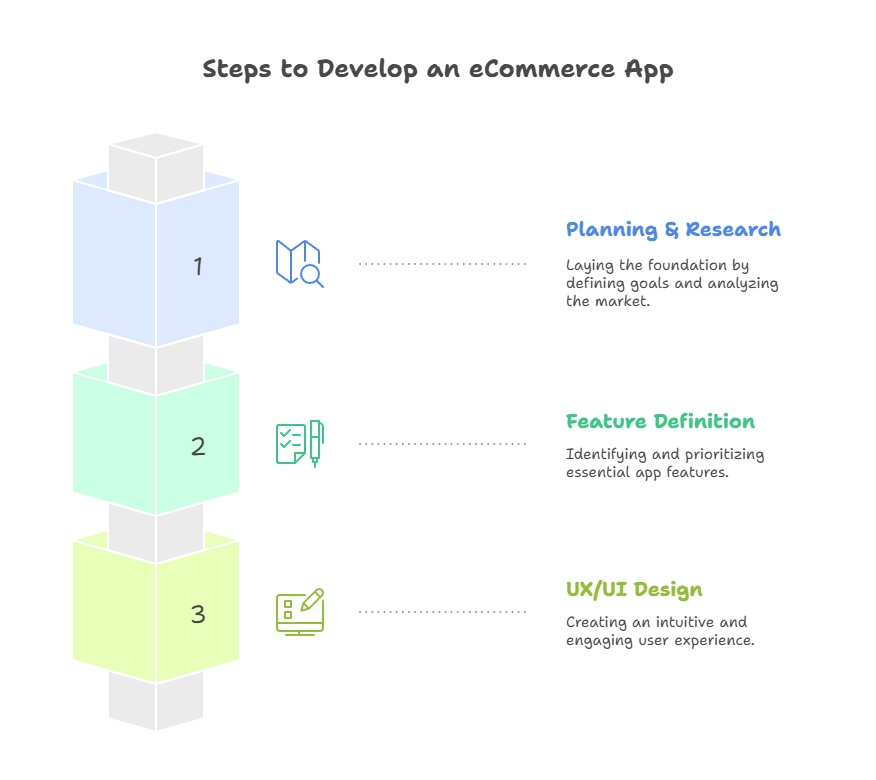
Before you start writing code or sketching app screens, it’s critical to lay a strong foundation through careful planning and research. This stage will determine how effectively your eCommerce application development project meets your business objectives.
Define Goals and Business Model
Start by outlining why you want to develop an eCommerce app. Are you aiming to increase online sales, expand into new markets, or provide a better experience for existing customers? Your goals will shape every decision moving forward.
Next, identify your business model:
- B2C (Business-to-Consumer): Selling directly to end-users (e.g., clothing, electronics).
- B2B (Business-to-Business): Supplying products or services to other businesses.
- C2C (Consumer-to-Consumer): Facilitating peer-to-peer sales via your platform.
Each model has unique requirements for features, marketing strategies, and user engagement.
Conduct Market & Competitor Analysis
Research your target market thoroughly—understand their demographics, shopping habits, and pain points. Use tools like Google Trends, industry reports, and customer surveys.
Competitive analysis is equally important. Study other apps in your niche—analyze their design, features, user reviews, and pricing. Focus on identifying gaps in competitors’ offerings, such as missing features, limited functionality, or poor user experience. Recognizing these opportunities can help you position your app uniquely and create a stronger value proposition in the market.
Ready to Build Your eCommerce App?
Set Clear KPIs and Success Metrics
Without measurable targets, it’s hard to know if your eCommerce app development is succeeding. Define KPIs early, such as:
- Monthly active users
- Average order value
- Conversion rate from app visits to purchases
- Cart abandonment rate
Tracking these metrics from launch will allow you to optimize your app for better performance over time.
By investing time in planning and research, you’re not just building an app—you’re creating a strategic tool designed to serve both your customers and your business objectives.
Step 2 – Feature Definition & Prioritization
Once you have a clear plan and research-backed insights, the next step in eCommerce application development is deciding which features your app should include. This is where you transform your vision into a tangible product roadmap. Defining and prioritizing features early on ensures your team focuses on delivering maximum value without overcomplicating the development process.
Must-Have Features for Every eCommerce App
When you make an eCommerce app, certain core functionalities are essential for providing a smooth and satisfying shopping experience:
- User Registration & Profile Management – A quick and secure sign-up/login process, preferably with options like social media or email authentication.
- Product Catalog – Organized, filterable product listings with high-quality images and detailed descriptions.
- Shopping Cart & Checkout – A frictionless process that lets customers add, modify, and purchase products with minimal steps.
- Multiple Payment Options – Integration with credit/debit cards, wallets, UPI, and even BNPL (Buy Now, Pay Later) services to boost conversion rates.
- Search & Filter – A robust search engine with filters for price, category, brand, ratings, etc., helps users find products quickly.
- Order Tracking – Real-time updates on order status and delivery timelines.
- Push Notifications – Keep customers informed about offers, discounts, and order updates.
These features form the backbone of your build eCommerce app process, ensuring a functional and user-friendly shopping platform from day one.
Advanced & Differentiator Features
Once the basics are in place, consider adding high-value features that can set your app apart:
- Personalized Recommendations – AI-driven suggestions based on browsing and purchase history.
- AR/VR Product Previews – Especially useful for fashion, furniture, or home décor.
- Voice Search – Improves accessibility and convenience.
- In-App Chat Support – Provides instant customer assistance without leaving the app.
- Loyalty Programs – Reward repeat purchases with points, discounts, or exclusive offers.
Including advanced features during your developing eCommerce app journey can significantly enhance user engagement and brand loyalty.
Prioritizing Features: MVP vs. Full-Scale Launch
When planning your eCommerce app development, you don’t need to launch with every possible feature. Instead, start with an MVP (Minimum Viable Product)—a streamlined version of your app containing only the most critical features.
- MVP Approach: Faster to market, lower initial cost, easier to gather real user feedback.
- Full-Scale Launch: Higher upfront investment but delivers a more complete experience from day one.
By prioritizing features, you ensure resources are allocated effectively and development timelines stay manageable. You can always add advanced features post-launch as your user base and revenue grow.
Step 3 – Designing UX/UI
In eCommerce app development, design isn’t just about aesthetics—it’s about creating an intuitive, engaging, and conversion-focused experience for users. Even the most feature-rich app will fail if customers find it confusing or frustrating to use. That’s why investing in strong UX (User Experience) and UI (User Interface) design is a critical step when you create an eCommerce app.
Why UX/UI Matters in eCommerce Application Development
A seamless design flow keeps users engaged, reduces drop-offs, and ultimately drives more sales. Studies show that a well-designed app can increase conversion rates by up to 200%. The goal is to make navigation effortless, product discovery quick, and the checkout process smooth—so customers complete their purchases without hesitation.
Core Principles of eCommerce UX Design
When you make an eCommerce app, keep these principles in mind:
- Simplicity Over Complexity – Avoid cluttered layouts. Each screen should focus on one primary goal—whether it’s browsing products, reading details, or completing checkout.
- Consistent Navigation – Maintain familiar navigation patterns like bottom tabs or hamburger menus so users don’t feel lost.
- Speed & Performance – A beautiful app that loads slowly will still lose users. Optimize images, enable caching, and ensure smooth transitions.
- Accessible Design – Include readable fonts, high contrast for text, and alt text for images so the app is usable for everyone.
UI Design: Creating a Visual Identity That Converts
UI design is where brand personality meets functionality. Colors, typography, and imagery should align with your brand while supporting usability. For example:
- Use high-quality product images that can be zoomed in for detail.
- Stick to brand-consistent colors to reinforce recognition.
- Use clear CTAs (Call-to-Actions) like “Add to Cart” or “Buy Now” in prominent positions.
Prototyping tools such as Figma, Adobe XD, or Sketch are invaluable here. They allow you to create interactive mockups and test designs with stakeholders or focus groups before moving to development.
Wireframes and Prototypes: Your Blueprint for Success
Before a single line of code is written, wireframes map out the structure of each screen, while prototypes simulate the app’s flow and interactions. This step reduces costly redesigns later and ensures that when you develop an eCommerce app, your team already has a validated design blueprint to follow.
In short, strong UX/UI design isn’t an afterthought—it’s a strategic investment. A visually appealing, easy-to-use interface will make your app stand out in a crowded market and keep customers coming back for more.
Want Step-by-Step Guidance to Create Your eCommerce App?
Step 4 – Choosing Tech Stack & Platform
Selecting the right technology stack is one of the most important decisions in eCommerce app development. The tech stack determines your app’s performance, scalability, security, and long-term maintainability. Whether you plan to make an eCommerce app from scratch or adapt an existing solution, your choices here will influence development cost, speed, and user satisfaction.
Native vs. Cross-Platform Development
When you create an eCommerce app, the first question is whether to build it natively or cross-platform.
- Native Development
- Platforms: Swift/Objective-C for iOS, Kotlin/Java for Android.
- Pros: Best performance, access to all device features, and smooth UI/UX.
- Cons: Requires separate codebases for iOS and Android, increasing time and cost.
- Cross-Platform Development
- Frameworks: Flutter, React Native, Xamarin.
- Pros: Single codebase for both platforms, faster development, reduced cost.
- Cons: Slightly less performance than native in some cases, limited access to certain platform-specific features.
For many businesses starting their eCommerce application development, cross-platform tools like Flutter or React Native strike the right balance between speed, cost, and performance.
Backend Technologies and Infrastructure
The backend is the engine that powers your app—handling user data, processing payments, managing inventory, and integrating with external systems. Common backend choices include:
- Node.js – Lightweight, scalable, ideal for real-time updates.
- Django / Python – Great for rapid development and robust security.
- Ruby on Rails – Known for quick prototyping and a rich library ecosystem.
Additionally, cloud platforms like AWS, Google Cloud, or Microsoft Azure provide scalable hosting, data storage, and security solutions essential for growing apps.
Database Selection
- SQL Databases (MySQL, PostgreSQL) – Structured data, strong reliability.
- NoSQL Databases (MongoDB, Firebase) – Flexible schemas, ideal for fast-changing product catalogs.
APIs and Integrations
Modern develop eCommerce app strategies often involve integrating with third-party services:
- Payment Gateways: Stripe, PayPal, Razorpay, Apple Pay, Google Pay.
- Shipping & Logistics APIs: Shiprocket, EasyPost, DHL APIs.
- eCommerce Platform APIs: Shopify, WooCommerce, Magento (for hybrid solutions).
Security Considerations
Security must be built into your tech stack from the start. This includes:
- SSL encryption for all transactions.
- Secure authentication methods (OAuth, 2FA).
- Regular security audits and code reviews.
By carefully choosing your tech stack and development approach, you set your build eCommerce app project up for long-term success. The right combination of technologies will ensure your app performs smoothly, scales efficiently, and delivers a reliable shopping experience to your customers.
Step 5 – Development Process
With your planning complete, features defined, and tech stack selected, it’s time to bring your vision to life. The development process in eCommerce app development is where design transforms into a functional product. This stage involves translating wireframes and prototypes into a working app that delivers a seamless shopping experience.
Adopting the Right Development Approach
Modern teams often use Agile or Scrum methodologies when they create an eCommerce app. These iterative approaches break the project into manageable sprints (usually 1–3 weeks each), allowing continuous testing, feedback, and refinement. Agile helps you adapt quickly if market trends shift or user needs evolve during the project.
Frontend Development
The frontend is what users see and interact with. For build eCommerce app projects, frontend development focuses on:
- Implementing the approved UI/UX designs.
- Ensuring responsive layouts for different screen sizes.
- Adding interactive elements such as animations, dropdown menus, and dynamic product filters.
Frameworks like Flutter and React Native are popular for cross-platform development, while Swift (iOS) and Kotlin (Android) are common for native builds.
Backend Development
The backend powers the core functionality of your eCommerce application development:
- User authentication and profile management.
- Product catalog management with real-time updates.
- Shopping cart and checkout logic that integrates with secure payment gateways.
- Order tracking and inventory management systems.
Robust backend development ensures your app can handle large volumes of users, transactions, and product data without crashing or slowing down.
API Development & Integration
APIs connect your frontend and backend, as well as third-party services like payment processors, shipping providers, and CRM systems. For example:
- Payment APIs (Stripe, PayPal, Razorpay).
- Shipping APIs (DHL, FedEx, Shiprocket).
- Analytics APIs (Google Analytics, Firebase).
Version Control & Continuous Integration
Using tools like Git for version control ensures code changes are tracked and reversible if needed. Continuous Integration (CI) pipelines automatically test and deploy new updates, reducing bugs and ensuring smooth releases.
Internal Testing During Development
Rather than waiting until the end, developers and QA teams test features as they’re built. This “test-as-you-go” method saves time, prevents compounding errors, and improves overall code quality.
By following a structured and iterative development process, you ensure that when you develop an eCommerce app, it launches faster, with fewer bugs, and a higher chance of delivering the experience your customers expect.
Step 6 – Testing & QA
After the core development phase, your eCommerce application development process moves into one of its most critical stages—testing and quality assurance (QA). Even the most well-coded app can fail if it’s released with bugs, poor performance, or security vulnerabilities. A thorough testing process ensures that when you build an eCommerce app, it delivers a seamless, reliable, and secure experience to users from day one.
Why Testing Is Essential in eCommerce App Development
An eCommerce app handles sensitive customer data, processes payments, and operates in a highly competitive market. A single crash during checkout or a security flaw can lead to lost revenue and damaged trust. Rigorous testing ensures:
- Bug-free user experiences.
- Consistent performance across devices and operating systems.
- Compliance with security and privacy regulations.
Types of Testing for eCommerce Apps
- Functional Testing
- Verifies that each feature works as intended—user registration, product search, add-to-cart, checkout, payment, and order tracking.
- Usability Testing
- Ensures navigation is intuitive, layouts are clear, and the shopping flow feels natural.
- Performance Testing
- Measures load times, response speed, and stability under heavy traffic (e.g., during flash sales).
- Security Testing
- Checks for vulnerabilities like SQL injection, weak authentication, or unencrypted data transfers.
- Compatibility Testing
- Confirms your app works seamlessly across multiple devices, screen sizes, and OS versions.
- Beta Testing
- Releases the app to a small group of real users before the official launch to gather feedback and detect unexpected issues.
Testing Tools & Best Practices
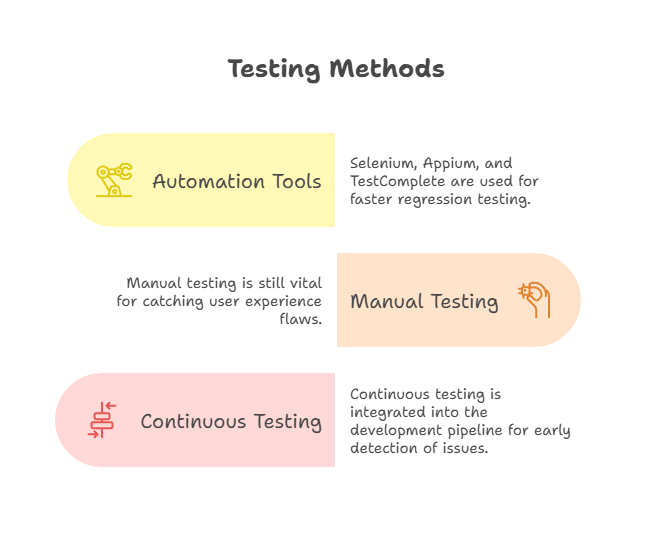
- Automation Tools: Selenium, Appium, and TestComplete for faster regression testing.
- Manual Testing: Still vital for catching user experience flaws that automation might miss.
- Continuous Testing: Integrated into the development pipeline for early detection of issues.
Step 7 – Launch & Deployment
After months of planning, designing, and building, your eCommerce application development journey reaches one of its most exciting milestones—launch. This stage involves more than simply uploading your app to the store; it requires a carefully managed process to ensure a smooth release, compliance with platform guidelines, and a solid foundation for ongoing success.
Preparing for Launch
Before you launch an eCommerce app, you need to ensure that:
- All features have passed final QA and beta testing.
- Your marketing and promotional materials (screenshots, descriptions, videos) are ready.
- The app complies with Apple App Store and Google Play guidelines to avoid rejection.
It’s also smart to have your customer support team briefed on the app’s functionality so they can handle queries effectively from day one.
App Store Submission Process
When you make an eCommerce app, launching on app stores involves:
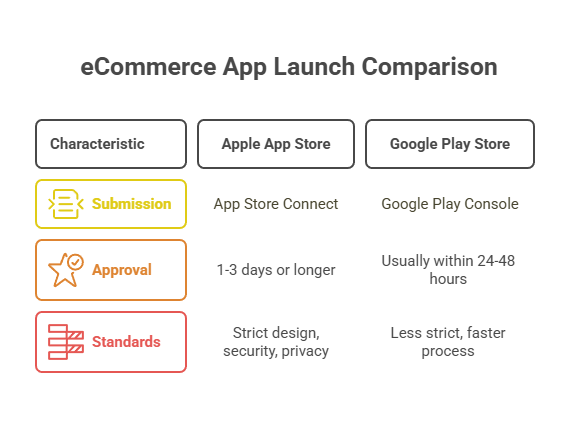
- Apple App Store (iOS): Submitting via App Store Connect, following Apple’s strict design, security, and privacy standards. Approval can take 1–3 days or longer.
- Google Play Store (Android): Using the Google Play Console for submission. The process is usually faster, often within 24–48 hours.
Both platforms require metadata such as:
- App name and description.
- Screenshots and promotional banners.
- App category and keywords for discoverability.
- Privacy policy and contact information.
Soft Launch vs. Full Launch
- Soft Launch: Releasing the app in select regions first to test performance, collect feedback, and fix any issues before a global rollout.
- Full Launch: Making the app available to your entire target audience after ensuring it’s stable and optimized.
Post-Launch Monitoring
Launching isn’t the end—it’s the beginning of the real test. Once your develop eCommerce app project is live, monitor:
- Crash reports and bug logs.
- App store ratings and reviews.
- Key performance metrics such as downloads, active users, and conversion rates.
Using analytics tools like Firebase, Mixpanel, or Google Analytics will help you spot patterns and make data-driven improvements quickly.
A well-executed launch ensures your build eCommerce app investment starts generating results immediately and positions you for long-term growth.
Transform Your eCommerce Vision into a Feature-Rich App?
Step 8 – Cost & Timeline Estimates
When you make an eCommerce app, understanding the budget and time commitment is critical for planning and execution. Costs can vary widely depending on the app’s complexity, the technology stack, and the development team’s location and expertise. A realistic estimate helps avoid budget overruns and delays.
Factors Influencing eCommerce App Development Costs
Several elements determine how much it will cost to build an eCommerce app:
-
Features and Functionality
- Basic apps with simple product listings and payment integration cost less than advanced solutions with AI-powered recommendations, AR try-ons, or custom analytics dashboards.
- Basic apps with simple product listings and payment integration cost less than advanced solutions with AI-powered recommendations, AR try-ons, or custom analytics dashboards.
-
Design Complexity
- A clean, minimalist design will cost less than a fully customized, animation-rich UI.
- However, investing in a premium design can significantly enhance user experience and boost conversions.
-
Platform Choice
- Single Platform (iOS or Android): Lower initial cost but limits your audience.
-
Cross-Platform or Both Platforms: Higher cost upfront but greater reach.
-
Development Team Location
- North America & Western Europe: $80–$150/hour.
- Eastern Europe: $40–$80/hour.
- India & Southeast Asia: $25–$60/hour.
-
Backend Infrastructure & Integrations
- Integrations with CRMs, ERP systems, inventory management tools, and advanced analytics can increase development costs.
| App Type | Features | Estimated Cost |
| Basic eCommerce App | Product catalog, cart, payments | $15,000 $30,000 |
| Mid-Level App | User accounts, advanced search, push notifications | $30,000 $60,000 |
| Advanced App | AI recommendations, AR, multi-vendor marketplace | $60,000 $150,000+ |
Average Cost Ranges These figures are based on industry averages and can vary depending on your eCommerce application development partner’s pricing model.
Timeline Estimates
| Development Stage | Duration |
| Planning & Research | 2–4 weeks |
| UI/UX Design | 3–6 weeks |
| Development | 12–20 weeks |
| Testing & QA | 3–5 weeks |
| Launch Preparation | 1–2 weeks |
| Total Estimated Time | 5–8 months |
The timeline for your develop eCommerce app project will also depend on whether you choose a waterfall or agile methodology. Agile development often allows for earlier launches with incremental improvements.
Cost Optimization Tips
- Start with an MVP to test your concept before investing in advanced features.
- Use cross-platform frameworks like Flutter or React Native to reduce costs.
- Partner with an experienced eCommerce app development company to avoid costly mistakes.
By understanding the financial and time investment early, you can create a clear, realistic roadmap for your build eCommerce app journey and ensure a smooth, on-budget delivery.
Step 9 – Post-Launch Support & Maintenance
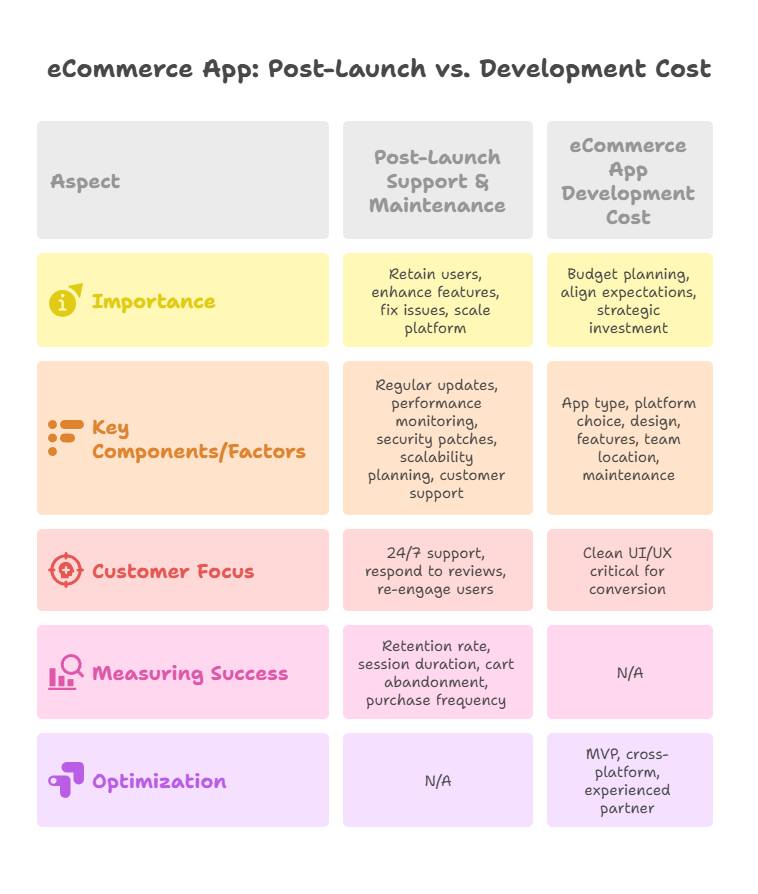
Launching your eCommerce app is a milestone worth celebrating—but it’s only the beginning. The real challenge lies in ensuring your app remains relevant, competitive, and high-performing in an ever-evolving digital marketplace. Continuous post-launch support and maintenance play a pivotal role in retaining users, enhancing features, fixing issues, and scaling your platform for long-term success.
1. Importance of Post-Launch Support
An eCommerce app is not a “set it and forget it” product. Consumer preferences, device technology, and security standards change rapidly. Without ongoing support, you risk:
- Losing customers due to poor performance or outdated features.
- Falling behind competitors who continuously innovate.
- Security vulnerabilities that can compromise user data.
Brands that invest in eCommerce application development beyond the launch phase see higher retention, improved user ratings, and increased conversion rates.
2. Key Components of Post-Launch Maintenance
A. Regular Updates & Feature Enhancements
Customers expect fresh experiences. Regular updates keep your app engaging and functional:
- Introduce new features based on user feedback.
- Refine UI/UX for better navigation and speed.
- Integrate emerging technologies like AI-driven recommendations or AR-based shopping previews.
B. Performance Monitoring & Bug Fixes
Constantly track your app’s loading speed, responsiveness, and error rates. Use tools like Firebase Performance Monitoring or New Relic to detect issues early. Quick bug fixes maintain a positive user experience.
C. Security Patches & Compliance
Cyber threats are on the rise, especially for payment-enabled apps. Ensure compliance with:
- PCI DSS for payment processing.
- GDPR or other regional data privacy laws.
Regularly release security patches to safeguard customer trust.
D. Scalability Planning
As your user base grows, so will the demand on your infrastructure. Work with your development team to:
- Upgrade server capacity.
- Optimize APIs for faster processing.
- Adopt cloud-based hosting for flexible scaling.
3. Customer Support & Engagement
An often-overlooked aspect of eCommerce app development is customer service integration:
- Offer 24/7 chat support or AI-powered help bots.
- Collect and respond to user reviews on app stores.
- Use push notifications and loyalty programs to re-engage inactive users.
4. Measuring Post-Launch Success
Define and track KPIs like:
- Retention rate
- Average session duration
- Cart abandonment rate
- Repeat purchase frequency
Analyzing these metrics allows you to make data-driven improvements that directly impact revenue.
Step 10 – Cost of eCommerce App Development
Understanding the cost of eCommerce app development is crucial for planning your budget and aligning expectations with your business goals. The investment you make will depend on factors like app complexity, features, design quality, and your development approach. Treat this as a strategic investment rather than just an expense—it directly impacts the app’s performance, scalability, and long-term profitability.
1. Factors Influencing eCommerce App Development Cost
A. App Type & Complexity
- Basic eCommerce App – Essential features like product listings, search, cart, and payment gateway.
- Mid-Level App – Includes advanced filters, personalized recommendations, loyalty programs, and analytics dashboards.
- High-End App – AI-driven features, AR product previews, multi-language support, omnichannel integration, and enterprise-level scalability.
The more complex your app, the higher the development time, expertise required, and ultimately, the cost.
B. Platform Choice
- iOS Only – Faster development, smaller audience but higher purchase intent.
- Android Only – Larger audience reach, slightly longer testing cycle due to device diversity.
- Cross-Platform – One codebase for both platforms; cost-effective but may have minor performance trade-offs compared to native apps.
C. Design & User Experience
A clean, intuitive UI/UX is critical for conversion. Custom-designed experiences cost more than template-based designs but deliver stronger user engagement.
D. Features & Integrations
Every added functionality impacts the budget. Examples:
- Secure payment gateways (Stripe, PayPal, Razorpay).
- Product recommendation engines.
- Multi-currency and multi-language support.
- Integration with ERP, CRM, or POS systems.
E. Development Team & Location
Rates vary significantly based on where your eCommerce application development team is located:
- North America & Europe – $80–$200/hour
- Australia – $70–$150/hour
- Asia (India, Vietnam, Philippines) – $25–$80/hour
F. Ongoing Maintenance
Post-launch expenses include:
- Server hosting fees.
- Regular updates & feature enhancements.
- Bug fixes & security patches.
- Marketing and customer support tools.
2. Average eCommerce App Development Cost (2025 Estimates)
| App Type | Estimated Cost Range |
| Basic | $15,000 – $30,000 |
| Mid-Level | $30,000 – $60,000 |
| Advanced/Enterprise | $60,000 – $150,000+ |
These estimates vary based on features, platforms, and team expertise. Adding cutting-edge features like AI product recommendations or AR try-ons can increase costs significantly.
3. How to Optimize Development Costs
- Start with an MVP (Minimum Viable Product) to validate the concept before investing in advanced features.
- Opt for cross-platform frameworks like Flutter or React Native for faster, cheaper multi-platform development.
- Partner with an experienced eCommerce app development company that can guide you on cost-saving strategies without sacrificing quality.
Conclusion – Turning Your eCommerce App Idea into a Success Story
Building an eCommerce app is no longer just about creating a digital storefront—it’s about delivering a seamless, engaging, and secure shopping experience that keeps users coming back. From market research and feature planning to development, testing, launch, and ongoing maintenance, every step plays a vital role in your app’s success.
In 2025’s highly competitive digital marketplace, customers have endless options. The brands that thrive are the ones that:
- Continuously innovate based on user feedback.
- Prioritize performance, security, and scalability.
- Keep evolving with technology trends like AI-driven personalization, AR try-ons, and voice commerce.
Remember, the launch is only the beginning of your eCommerce journey. Long-term growth depends on post-launch support, strategic updates, and adapting to shifting market dynamics. With the right approach, your app can become more than just a sales channel—it can be the heartbeat of your business, driving revenue, brand loyalty, and market expansion.
Whether you’re a startup or an established brand, partnering with an experienced mobile app development company can accelerate your journey, helping you avoid costly mistakes and build a platform that stands out.
Let's Convert Your Business Idea Into Success!
Free Consultation from Top Industry Experts
Let’s Build Your Dream App!
Share article on :



Ready To Fuel Your Vision With AI-Powered Innovation?


Level- 18, Dubai World Trade Centre Tower, Sheikh Rashid Tower, Sheikh Zayed Rd, Dubai, UAE
business@code-brew.com +971-55-645-7972
Plot no I - 36, Sector 83 Alpha, Mohali SAS Nagar 140308
business@code-brew.com +91-771-976-8427
Al Akaria 2, 6926 Olaya Street, RHOA2566, Riyadh, Saudi Arabia.
business@code-brew.com
Av. Miguel Hidalgo y Costilla 1995, Arcos Vallarta, 44600 Guadalajara, Mexico
business@code-brew.com +1(213)2614953
4231 Balboa Ave #512 San Diego, CA 92117 United States
business@code-brew.com +1(213)2614953
2nd floor, College House, 17 King Edwards Rd, London HA4 7AE, UK
business@code-brew.com +44 (20) 82644493
Partner With Experts Who Leverage AI & Tech To Transform Ideas Into Market-Leading Solutions.
Wait! Looking for Right Technology Partner For Your Business Growth?
It's Time To Convert Your Business Idea Into Success!
Get Free Consultation From Top Industry Experts:
I would like to keep it to myself