Table of Content

Quick Summary:
- The Voice-First Shift: Users no longer rely solely on taps or swipes. Integrating your app with Siri and Gemini is now mandatory for visibility.
- The Sub-Second Mandate: Voice AI can't tolerate loading spinners. If your backend doesn't respond in under a second, users will leave.
- The Double-Charge Trap: AI assistants automatically retry slow requests. Without idempotency keys on your server, a simple voice command can result in duplicate bookings or double charges.
- The Cost of Integration: Adding voice AI to an existing app ranges from $25k–$60k (6–10 weeks). Building a new app ranges from $120k–$300k.
- The AI-Readiness Roadmap: Transitioning to an AI-ready app requires a 5-phase architectural shift, starting with restructuring your data and ending with rigorous testing.
The tap-and-swipe interface is no longer the only way users interact with your mobile app. With over 60% of mobile users using voice or system-level prompts, AI assistants are fundamentally changing user behavior and, in turn, how you build mobile apps.
Table of Content
If a user tells Siri to “rebook my last ride,” the AI assistant executes the task without opening your app. Apple enables this through App Intents. Google achieves this via App Actions and Gemini Extensions. So for businesses in 2027, it is essential to build mobile apps for voice AI.
This guide breaks down the architecture, backend requirements, and the true cost of mobile app development for OS-level AI assistants.
What Does It Take to Connect Your App to Siri and Gemini?
If you want to know how to build a mobile app that interacts with Siri or Gemini, you must define your app’s core functions as discrete, machine-readable actions using Apple’s App Intents or Google’s App Actions.
This allows the AI assistant to parse spoken requests, trigger the correct action via a secure API, and return a confirmation to the user without them opening the app.
Why This Matters for App Visibility
Without this setup, Siri and Gemini can only launch your app; they can’t execute tasks inside it. If a competitor’s app is integrated and yours is not, the assistant will select the competitor.
In addition to that, this integration surfaces your app in Apple Spotlight, widgets, and the Dynamic Island, ultimately increasing app visibility.
How App Intents Work (Apple iOS)
Apple replaced the older SiriKit with App Intents to allow developers to define any custom action, rather than being restricted to fixed categories. Teams building AI-first mobile apps use this to break down core functions into modular, reusable code snippets.
- Conversational Feedback: You define the exact voice response Siri gives upon completion.
- Data Resolution: You allow Siri to read your app’s data so it understands context like “the usual” or “my go-to coffee order.”
How App Actions Work (Google Android/Gemini)
Google provides two paths for voice integration:
- Pre-built Templates: For common tasks like food ordering or ride-booking, developers can plug into Google’s ready-made templates.
- Custom Extensions: For unique tasks, you write a schema that describes what the app can do, allowing Gemini to read and call it directly.
The Biggest Mistake: Teams test their integration with one clean voice command and stop. Real users use dozens of variations. Thus, you must use AI integration services to map natural language variations before deployment. Otherwise, the AI assistant will fail to understand real users.
Is your app ready for the voice-first era?
Talk to our engineering team for a free technical audit of your current mobile app architecture.
How to Get Your Backend Ready for Voice AI?
Backend systems for AI-powered mobile apps require low-latency APIs (under 1 second), idempotent endpoints to prevent duplicate transactions during automated retries, and context-aware session management to handle conversational follow-ups.
1. The Speed Problem
Tap-based apps can tolerate a two-second loading spinner. Voice requests can’t. Silence longer than one second reads as a failure.
To fix this, mirror Apple and Google’s architecture: handle simple requests via on-device AI models and keep frequently used data stored locally on the device. Build a lightweight microservice for these quick lookups rather than routing voice requests through your full application backend.
2. The Double-Charge Problem
Assistants often automatically retry failed or slow API calls. If your app processes a booking or payment twice, it results in a duplicate charge.
Implement idempotency keys. Every assistant request must include a unique request ID. Your server checks this ID to ensure the transaction is only processed once.
3. The Context Problem
If a user says, “actually, make that two,” your backend needs to know what “that” refers to. Your intent handling must track the current conversation state, linking sequential voice commands to the same session.
Real-World Examples of Voice AI Integration

Here is how different industries are already leveraging AI integration solutions to build voice commands.
-
Ride-Hailing and Delivery
When asked for a ride, the app must return a live price and ETA in under a second. These apps use a separate, high-speed pricing microservice and build robust cancellation paths, as a slow cancellation is just as damaging as a slow booking.
-
Food Ordering
“Order my usual” only works if the app can match the phrase to a specific user’s history. Food ordering or delivery apps use secure, token-based authentication already stored on the phone to fetch the user’s order history without requiring a manual login.
-
Banking and Finance
Security is paramount in fintech. Voice-activated banking apps require biometric verification as part of the request. Most institutions limit assistant actions to read-only (balance checks, recent transactions) initially, adding transfers only after rigorous security testing.
-
Travel and Hospitality
When it comes to travel and tourism, airlines and hotels expose check-in status and rebooking actions. This is critical during disruptions, allowing users to fix issues quickly without navigating a complex app while standing in an airport line.
Cost of Mobile App Development for AI Voice
Adding voice AI integration to an existing app is faster and cheaper than building it from scratch. Here is the breakdown of mobile app development costs for AI voice integration.
| Integration Type | Estimated Cost (USD) | Estimated Timeline | What Is Included |
| Existing App (5–10 actions) | $25,000 – $60,000 | 6–10 weeks | API mapping, fast-response layer build, testing against natural phrasing. |
| New App (built from scratch) | $120,000 – $300,000 | 4–7 months | Full app development plus assistant layer designed from day one. |
| Banking/Healthcare App | Add $15,000 – $40,000 | Add 2–4 weeks | Extra security, compliance checks, and stricter app store review handling. |
| Cross-Platform (iOS + Android) | Add 30% – 40% to base cost | Add 3–5 weeks | Separate mapping and testing for Apple App Intents and Google App Actions. |
| Ongoing Maintenance | 10% – 15% of build cost per year | N/A | Monitoring success rates, OS update adjustments, adding new actions. |
The AI-Readiness Roadmap: How to Make Your App AI-Ready
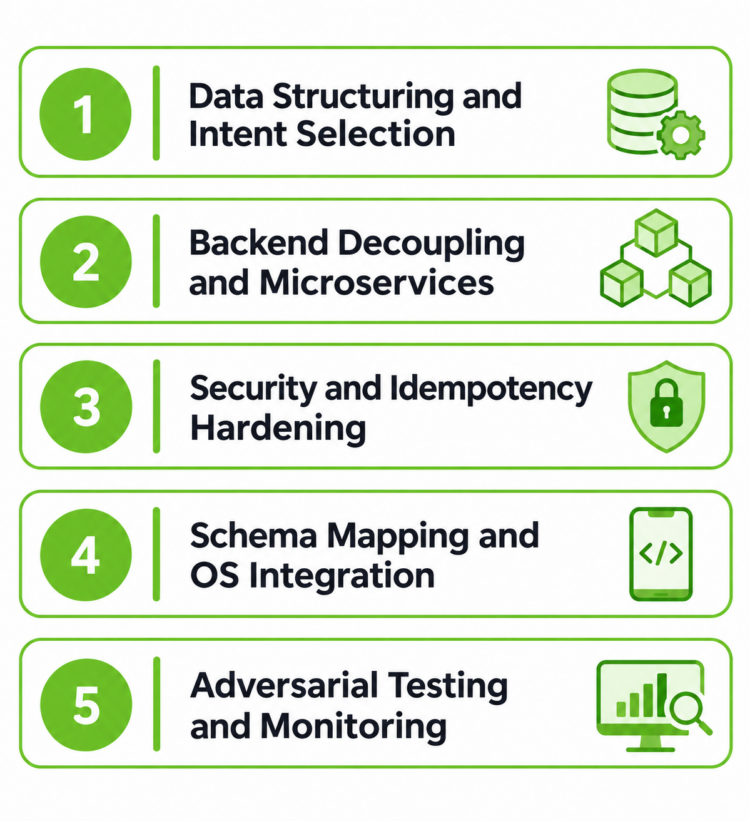
Transitioning from a traditional app to an AI-first mobile app is not a single update; it is an architectural shift. It requires a phased roadmap. Here is the 5-phase roadmap to make your app fully AI-ready for Siri and Gemini.
Phase 1: Data Structuring and Intent Selection (Weeks 1–2)
AI assistants rely on structured data, not open text. During this phase, you must audit your analytics to identify the 5–10 most frequent user actions. Then restructure the backend data tied to these actions.
For example, replace open text fields for addresses with verified location data, and use strict categories for menus or inventory. This drastically reduces the failure rate when the AI attempts to parse a user’s request.
Phase 2: Backend Decoupling and Microservices (Weeks 3–5)
Voice requests demand sub-second response times. If Siri or Gemini has to route a request through your entire monolithic backend just to check a delivery status, the user will experience a timeout.
This phase involves building a separate, lightweight API microservice dedicated exclusively to handling assistant queries. This makes more sense when it comes to super app development.
Phase 3: Security and Idempotency Hardening (Weeks 6–7)
When voice assistants interact with your app, they operate without a visible UI. If the network lags and the assistant automatically retries a request, your app could process a double payment or a duplicate booking.
You must implement idempotency keys (unique transaction IDs) on your server to ensure that even if the AI sends the same request three times, the action only executes once. For banking or healthcare apps, biometric verification (Face ID) must also be integrated into the voice flow.
Phase 4: Schema Mapping and OS Integration (Weeks 8–10)
This is where your app officially becomes an AI-ready mobile app. Your engineering team will write the schemas for Apple’s App Intents and Google’s App Actions.
This involves defining exactly what parameters the assistant needs to call the action, and what conversational response it should speak back to the user upon success or failure.
Phase 5: Adversarial Testing and Monitoring (Ongoing)
Testing a single clean voice command is not enough. During this phase, you test every action against dozens of natural language variations, accents, and background noise.
Post-launch, you must establish a monitoring system that tracks success and failure rates across both iOS and Android, updating your schemas as Apple and Google release new OS betas.
Where to Start? Implementation Steps
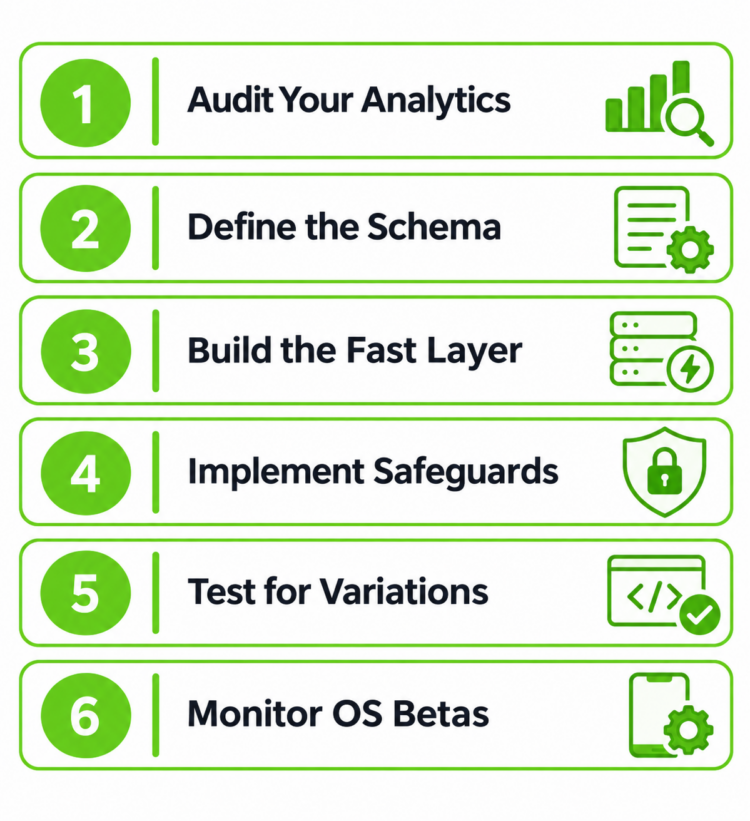
If you are ready to get started with one of your most profitable mobile app ideas, follow this sequence for voice AI integration:
- Audit Your Analytics: Do not guess which features to integrate. Pull data from your app to identify the 5–10 actions users perform most frequently.
- Define the Schema: For each action, define the exact parameters. What is the action name? What data does it require? What does a successful result look like?
- Build the Fast Layer: Create a lightweight backend microservice dedicated to handling assistant requests. Keep this separate from your main monolithic backend to ensure millisecond response times.
- Implement Safeguards: Build idempotency logic and duplicate-prevention mechanisms for all financial or booking-related actions before launching.
- Test for Variations: Test every action with at least a dozen different phrasings. Test with background noise, accents, and conversational follow-ups.
- Monitor OS Betas: Apple and Google change their voice frameworks frequently. So, test your integration against new iOS and Android beta releases before public rollout to catch broken intents early.
Why Choose Code Brew Labs for Voice AI Integration?
As an award-winning AI and app development company, Code Brew Labs understands that connecting your app to Siri and Gemini requires deep expertise in both mobile OS architecture and language models. Thus, we bring the engineering depth required to make AI voice integration reliable, not just functional, when building a mobile app.
-
Production-Grade AI Experience
We don’t just write API wrappers. We build production conversational AI, including natural-language booking and lead qualification systems. Our team knows how to map user intent to backend logic, ensuring your app responds correctly to natural speech.
-
CMMI Level 3 Governance
Voice integrations fail quietly. A sloppy intent mapping might process the wrong action or fail silently without an error message. We operate under CMMI Level 3 and ISO 9001:2015 certifications, meaning every build goes through rigorous review, security, and testing.
-
Full-Stack Mobile Mastery
With 13+ years of experience and 5,000+ projects delivered across 150+ countries, we have the infrastructure to build assistant integrations for existing apps or architect new AI-first mobile apps from scratch. Our delivery teams across the USA, UK, UAE, and India provide round-the-clock development coverage.
-
Free Technical Scoping
We start every engagement with a discovery phase: auditing your existing API, identifying the highest-value actions to expose to Siri and Gemini, and providing a fixed cost and timeline estimate.
The Bottom Line
Siri and Gemini are evolving into a second front door for your application—one that bypasses the traditional UI entirely. Preparing for this means defining your app’s core actions clearly, building a low-latency backend layer to handle them safely, and testing against how real users speak. Apps that treat voice AI as core infrastructure during their mobile app development today will be the default choice for users tomorrow.
Ready to build your AI-ready mobile app?
Book a 30-minute discovery call with our mobile and AI engineers to map out your voice integration roadmap.
Frequently Asked Questions
Do I need separate work for Siri and Gemini, or does one setup cover both?
You need separate work. Apple’s App Intents and Google’s App Actions use different formats and schemas. Each platform requires its own mapping, testing, and deployment.
Can I add this to an app I already have?
Yes. Most teams start by integrating 5–10 high-use actions into their existing app. Ultimately, this keeps the cost of mobile app development and timeline manageable compared to rebuilding the entire application.
How much does it cost to build an app with this included?
Adding voice integration to an existing app costs $25,000–$60,000. Building a new mid-size app with the assistant layer included from day one costs $120,000–$300,000, depending on platform coverage and whether you are using an AI mobile app development company to handle the build.
Is this safe for banking or healthcare apps?
Yes, with specific safeguards. Both Apple and Google enforce stricter review and authentication requirements for financial and health actions. Thus, integrating biometric verification into the voice flow adds time and cost, but ensures compliance.
What happens if Apple or Google update their systems?
Integrations can break quietly after an OS update. So, you must schedule regular testing against iOS and Android beta versions to catch deprecations or broken intents before they affect real users.
Let's Convert Your Business Idea Into Success!
Free Consultation from Top Industry Experts
Let’s Build Your Dream App!
Share article on :


Ready To Fuel Your Vision With AI-Powered Innovation?


Level- 18, Dubai World Trade Centre Tower, Sheikh Rashid Tower, Sheikh Zayed Rd, Dubai, UAE
business@code-brew.com +971-50-466-8387
Plot no I - 36, Sector 83 Alpha, Mohali SAS Nagar 140308
business@code-brew.com +91-771-976-8427
Al Akaria 2, 6926 Olaya Street, RHOA2566, Riyadh, Saudi Arabia.
business@code-brew.com
Av. Miguel Hidalgo y Costilla 1995, Arcos Vallarta, 44600 Guadalajara, Mexico
business@code-brew.com +1(213)2614953
4231 Balboa Ave #512 San Diego, CA 92117 United States
business@code-brew.com +1(213)2614953
2nd floor, College House, 17 King Edwards Rd, London HA4 7AE, UK
business@code-brew.com +44 (20) 82644493
Partner With Experts Who Leverage AI & Tech To Transform Ideas Into Market-Leading Solutions.
Wait! Looking for Right Technology Partner For Your Business Growth?
It's Time To Convert Your Business Idea Into Success!
Get Free Consultation From Top Industry Experts:
I would like to keep it to myself