Table of Content

Key Takeaways
- Learn how modern HMI systems connect PLCs, SCADA, ERP, AI, and IIoT architectures in real-time industrial environments.
- Understand why 70%+ of industrial HMI failures originate from poor architecture, testing, or operator workflow planning.
- Explore real-world HMI development workflows, including embedded systems, edge computing, HIL testing, and compliance engineering.
- Compare leading HMI platforms like Ignition, WinCC, FactoryTalk, Qt/QML, and web-based industrial dashboard stacks.
- Discover how AI-driven alarm management, predictive analytics, and OPC UA/MQTT pipelines are reshaping Industry 4.0 operations.
- Get US market cost benchmarks, cybersecurity best practices, IEC 62443 compliance guidance, and build-vs-buy decision frameworks for 2026 HMI projects.
Table of Content
Modern HMI systems are no longer static panel displays. In 2026, they are the convergence point of edge AI, IIoT data pipelines, cybersecurity policy, and operator experience design. Yet most resources online cover only surface-level definitions and vendor marketing.
This guide is written for engineering leaders, industrial software buyers, and technical decision-makers evaluating HMI projects. It covers what competitors skip: architecture depth, AI integration realities, failure modes, compliance mapping, and a clear-eyed framework for build vs. buy decisions.
What Is HMI Software Development?
HMI software development involves creating the visualization, control, and data interface layer between human operators and industrial systems. The output is not an app — it’s a real-time control surface where latency, reliability, and compliance are non-negotiable.
How HMI Differs from General UI/UX Software Development?
Standard UI development optimizes for engagement, aesthetics, and cross-platform compatibility. HMI development optimizes for operator situational awareness, deterministic response times, and hardware-level signal fidelity. An unhandled exception in a consumer app is an annoyance. In an HMI controlling a chemical reactor, it’s a safety incident.
HMI code must interface directly with PLC tag databases, handle OPC UA or MQTT data streams, manage alarm queues in priority order, and render in under 100ms on constrained embedded hardware — all simultaneously.
Real-Time Control vs. Data Visualization vs. Supervisory Functions
HMIs serve three distinct functional roles depending on deployment depth:
- Real-time control HMIs: Direct machine actuation, setpoint writing, emergency stop triggers
- Data visualization HMIs: Trend displays, OEE dashboards, historian queries
- Supervisory HMIs: Multi-node plant overview, remote monitoring, SCADA-level aggregation
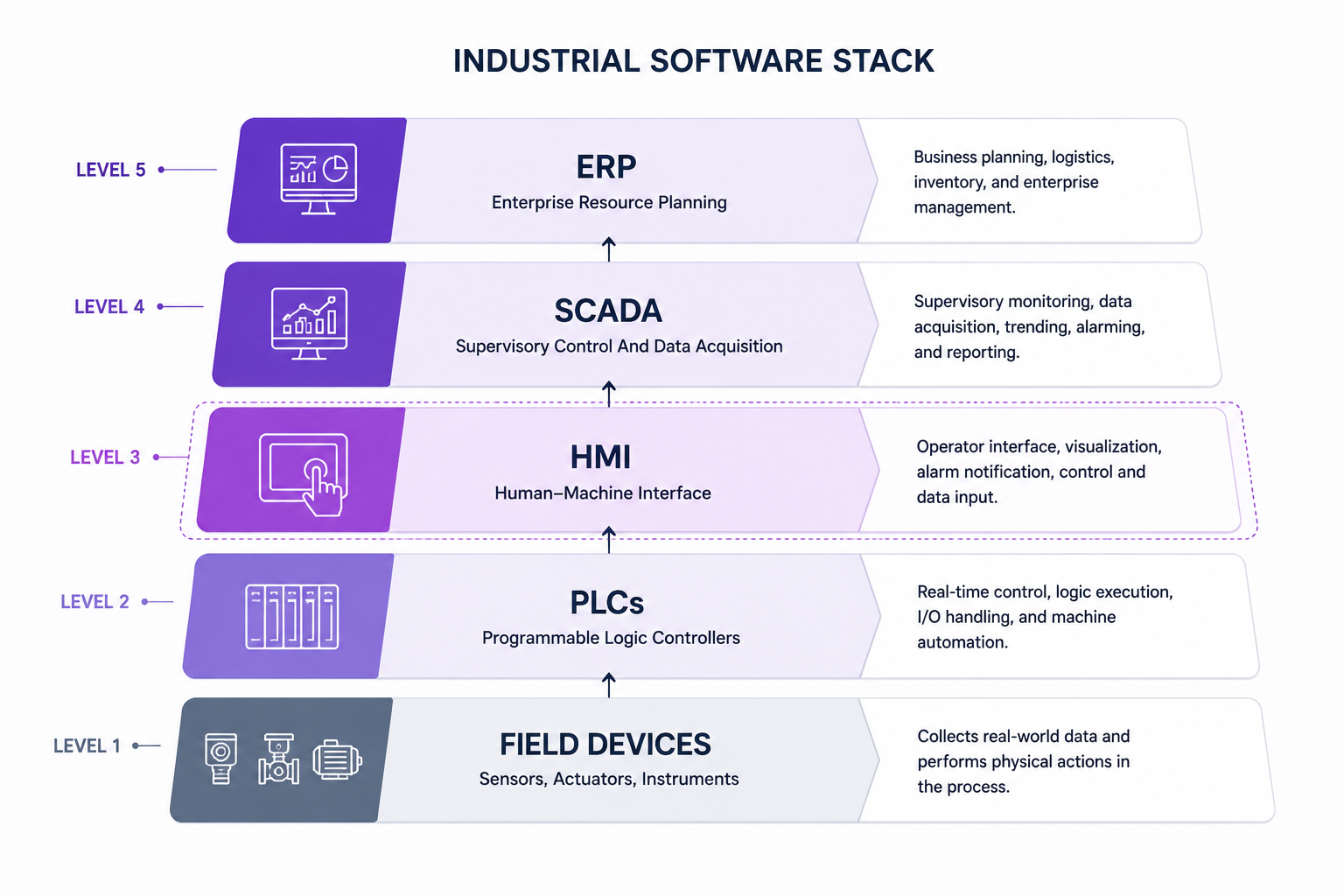
Where HMI Fits in the Industrial Software Stack
The industrial stack runs: Field Devices → PLCs → HMI → SCADA → MES → ERP. HMI sits at the critical junction between machine-level control and enterprise reporting. Errors at this layer propagate both downward (wrong setpoints to PLCs) and upward (corrupted data to MES).
HMI vs. SCADA vs. DCS — Functional Comparison Matrix
| Dimension | HMI | SCADA | DCS |
| Primary role | Operator interface at machine/line level | Supervisory monitoring across multiple HMIs | Distributed process control across plant |
| Data scope | Single machine or line | Multiple sites, historians, remote assets | Entire plant process loop |
| Real-time control | Yes (PLC-bound) | Limited (monitoring + command) | Yes (native to process control) |
| Connectivity | OPC UA, Modbus, Profibus, MQTT | OPC DA/UA, DNP3, IEC 104 | Proprietary fieldbus + OPC UA |
| Typical deployment | Panel PC, embedded display | Server + workstation cluster | Dedicated DCS hardware suite |
| US vendor examples | Rockwell, Siemens, Schneider | Wonderware, Ignition, GE iFIX | Emerson DeltaV, Honeywell Experion |
HMI System Architecture: Real-Time, Embedded, and Distributed Models
HMI architecture is where most projects either build a strong foundation or inherit a decade of technical debt. Choosing the wrong architecture for your hardware target, latency requirements, or plant topology is one of the most expensive mistakes in industrial software development.
Core Architectural Layers: Presentation, Communication, Data, Control
Every robust HMI system is built across four layers:
- Presentation layer: Screen rendering, widget libraries, alarm display logic, operator input handling
- Communication layer: Protocol drivers (Modbus TCP, OPC UA, MQTT, Profibus, EtherNet/IP), data polling, and publish-subscribe routing
- Data layer: Tag databases, historian integration, real-time data buffering, and time-series management
- Control layer: PLC tag binding, setpoint write-back, interlock logic visualization
Architectural failure often begins here: teams over-invest in the presentation layer while neglecting communication layer latency and data layer scalability.
Embedded HMI Architecture (Bare-Metal vs. RTOS vs. Linux-Based)
Bare-metal: Maximum determinism, minimum overhead. Used where response times under 10ms are mandatory. Requires deep firmware expertise and limits UI complexity.
RTOS (FreeRTOS, Zephyr, QNX): Task scheduling with priority control. Enables more complex UIs while preserving real-time guarantees. Standard for safety-critical embedded HMIs in medical devices and automotive.
Linux-based (Yocto, Buildroot): Full OS stack with modern embedded software development frameworks. Supports Qt/QML, WebAssembly, and containerized applications. Latency is less deterministic but acceptable for most visualization-dominant use cases.
Distributed HMI Architecture for Multi-Node Industrial Plants
Single-panel HMIs don’t scale to multi-line or multi-site operations. Distributed HMI architectures centralize tag management and alarming while distributing display nodes across the plant floor.
Key design decisions in distributed HMI:
- Tag server placement: Central tag server vs. edge-local tag caching for network resilience
- Redundancy: Hot-standby display servers for process-critical visualization
- Synchronization: Consistency guarantees across display nodes when network partitions occur
Edge vs. Cloud HMI Processing
Cloud-connected HMI architectures enable enterprise dashboards, remote monitoring, and AI analytics — but introduce latency that local control loops cannot tolerate. The practical resolution used in most modern US manufacturing deployments:
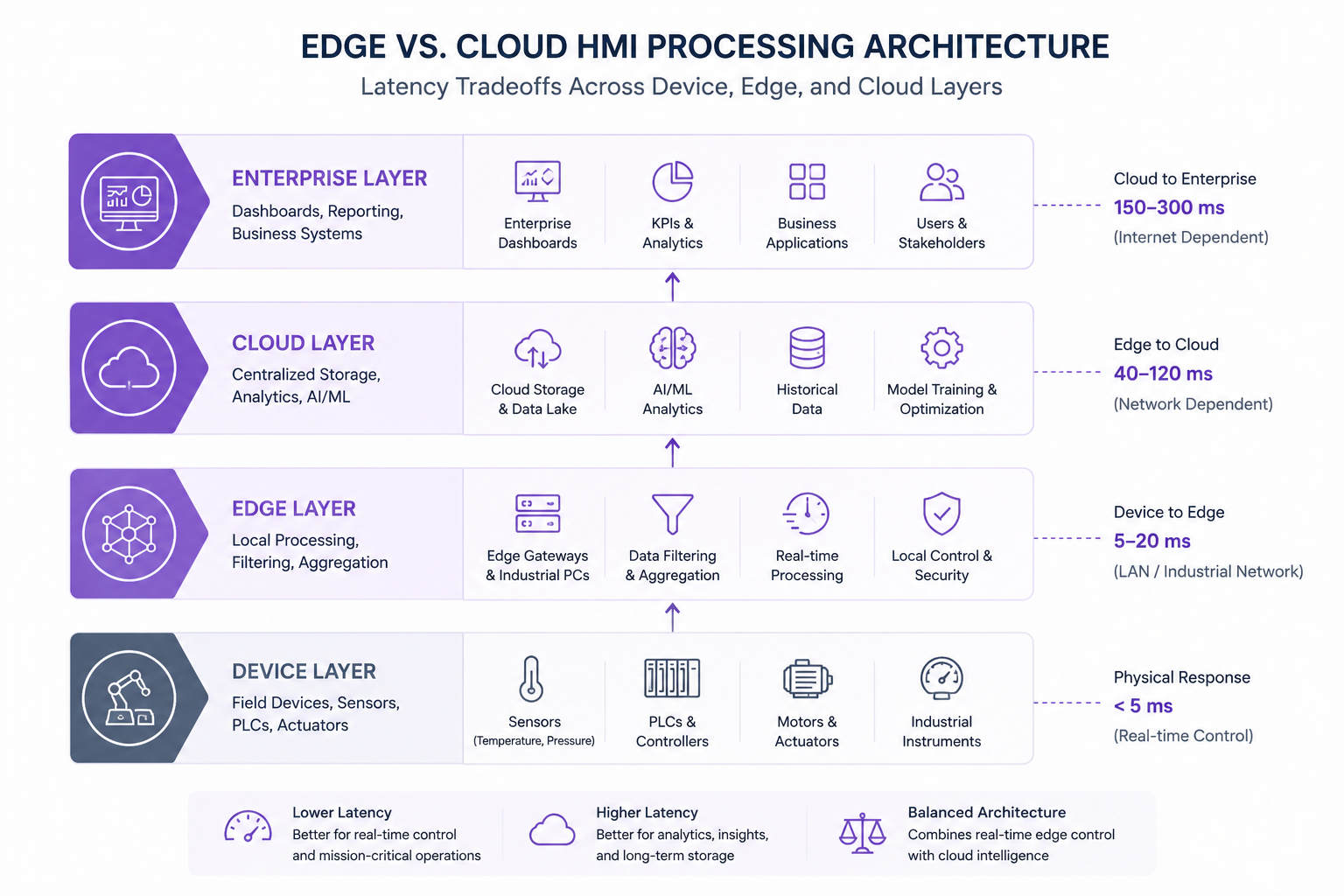
- Enterprise layer: Enterprise dashboards, industrial reporting systems, KPI monitoring, business applications, and stakeholder visibility across connected manufacturing operations.
- Cloud layer: Historian data, predictive analytics, remote monitoring, and enterprise reporting.
- Edge layer: All real-time visualization and control binding runs locally. No dependency on cloud availability.
- Device layer: Industrial sensors, PLCs, actuators, motors, and field devices handling machine-level control and real-time operational data generation.
UI/UX Design Principles for Industrial HMI Interfaces
Industrial UX is a distinct discipline. The ISA-101 standard — not Material Design or Apple HIG — governs display design for process control environments. Violating these conventions doesn’t just produce poor UX; it creates safety risk.
ISA-101 Standard Compliance for Industrial Display Design
ISA-101 (Human Machine Interfaces for Process Automation Systems) provides the definitive design standard for process industry HMIs in the US. Key requirements:
- Color philosophy: Color is a secondary indicator, not the primary information carrier. Avoid relying on red/green alone for state indication (colorblindness affects ~8% of male operators).
- Background: High-situational-awareness displays use gray backgrounds (not white or black) to allow abnormal state colors to stand out.
- Alarm state hierarchy: Four alarm levels (advisory, critical, warning, emergency) with distinct visual weights.
ISA-101 Color Coding Standards vs. Common HMI Design Violations
| Element | ISA-101 Recommendation | Common Violation |
| Background | Medium gray (approx. #808080) | White or black backgrounds |
| Normal state | Gray/muted tones | Bright colors on all elements |
| Abnormal/alarm | High-contrast yellow, red | Uniform red for all alerts |
| Primary text | Dark on light, high contrast | Low-contrast text on colored backgrounds |
| Animated elements | Reserved for active alarms | Decorative animations throughout |
Cognitive Load Reduction: Color Hierarchy, Alarm Prioritization, Visual Clarity
Alarm fatigue is a documented safety risk. In high-volume process plants, operators may face thousands of alarm events per day — the majority of which are nuisance alarms that mask the critical few.
Effective HMI design addresses this through:
- Alarm shelving and suppression logic built into the HMI layer
- Priority-weighted alarm lists (not chronological)
- Rationalization workflows that filter alarm events before display
- Minimal-motion design: Animation is reserved for active abnormal states only
Designing for Harsh Environments: Glare, Noise, Gloved Operation, Mobility
Panel PC screens in steel mills face direct sunlight glare, vibration, and operators wearing heavy gloves. Design requirements that follow: touch targets minimum 15mm x 15mm, 1000-nit display brightness for outdoor/high-lux environments, resistance to accidental actuation through minimum hold-time requirements for critical controls.
Operator-Centered vs. Engineer-Centered Design — The Usability Gap
The most common HMI design failure isn’t technical. It’s a process failure: engineers design for their own mental model of the system rather than for operator task workflows.
Operator-centered design starts with task analysis:
- What decisions does the operator make, and in what sequence?
- What information is needed to make each decision, and how urgently?
- What actions are available, and how are they confirmed?
Engineer-centered designs expose all available data. Operator-centered designs expose only the data needed for the next decision.
AI and IoT Integration in Modern HMI Systems (2025–2026)
AI integration in HMI is moving past the pilot stage. Leading US manufacturers are deploying production-grade AI capabilities at the interface layer — not just in back-end analytics systems.
Predictive Analytics Overlays: Surfacing Anomalies Directly in the HMI View
Traditional HMIs display what is happening. AI-augmented HMIs surface what is about to happen.
Pattern: Edge inference models (deployed on the same hardware as the HMI runtime or on a co-located edge server) process sensor streams in real time and push anomaly scores, predicted remaining useful life (RUL) values, and deviation alerts directly into the HMI display layer.
The UX challenge: surfacing predictions without overwhelming operators. Effective implementations use subtle visual cues (amber tinting, trend micro-charts) rather than additional alarm events.
AI-Assisted Alarm Management
AI models trained on historical alarm-process correlations can filter nuisance alarms, suppress correlated alarm floods, and route critical alerts to the front of operator attention queues.
According to CISA advisories and ISA-18.2 guidance, alarm fatigue is a documented contributor to industrial incidents. AI-assisted alarm rationalization reduces standing alarm counts by 40–70% in documented deployments, without reducing safety-critical alert coverage.
IIoT Data Pipelines Feeding Real-Time HMI Dashboards
The two dominant protocols for IIoT-to-HMI data integration in US industrial environments:
- OPC UA: The standard for PLC-to-HMI and SCADA integration. Supports complex data types, security certificates, and pub-sub architecture. Required for most enterprise-grade HMI platforms.
- MQTT: Lightweight publish-subscribe protocol suited for high-frequency sensor data from constrained edge devices. Common in IIoT sensor networks feeding HMI dashboards via broker middleware (Mosquitto, HiveMQ).
Natural Language and Gesture-Based HMI Interaction (SDV + Robotics)
In automotive cockpit HMI and collaborative robotics applications, natural language and gesture interaction are moving from concept to production.
A 2025 narrative review in Applied Sciences identifies information overload, AI/AR integration, and cognitive safety as the primary challenges in next-generation automotive HMI design — reinforcing the need for multimodal interaction that reduces operator visual attention demands.
Voice command HMIs in industrial settings face noise floor challenges. Current deployments combine directional microphones, noise-canceling preprocessing, and constrained command vocabularies (rather than open NLP) to achieve reliable operation.
AR/Mixed Reality HMI Overlays in Field Service and Aerospace Maintenance
AR-based HMI overlays are gaining traction in field service and aerospace maintenance, projecting equipment status, maintenance procedures, and live sensor data into the operator’s visual field via smart glasses or tablet-based AR.
These systems represent an architectural extension of traditional HMI — the display layer migrates to the field, while data and control layers remain centralized.
HMI Software Development Process: End-to-End Technical Workflow
A structured development process is the clearest differentiator between HMI projects that commission cleanly and those that spend months in rework cycles.
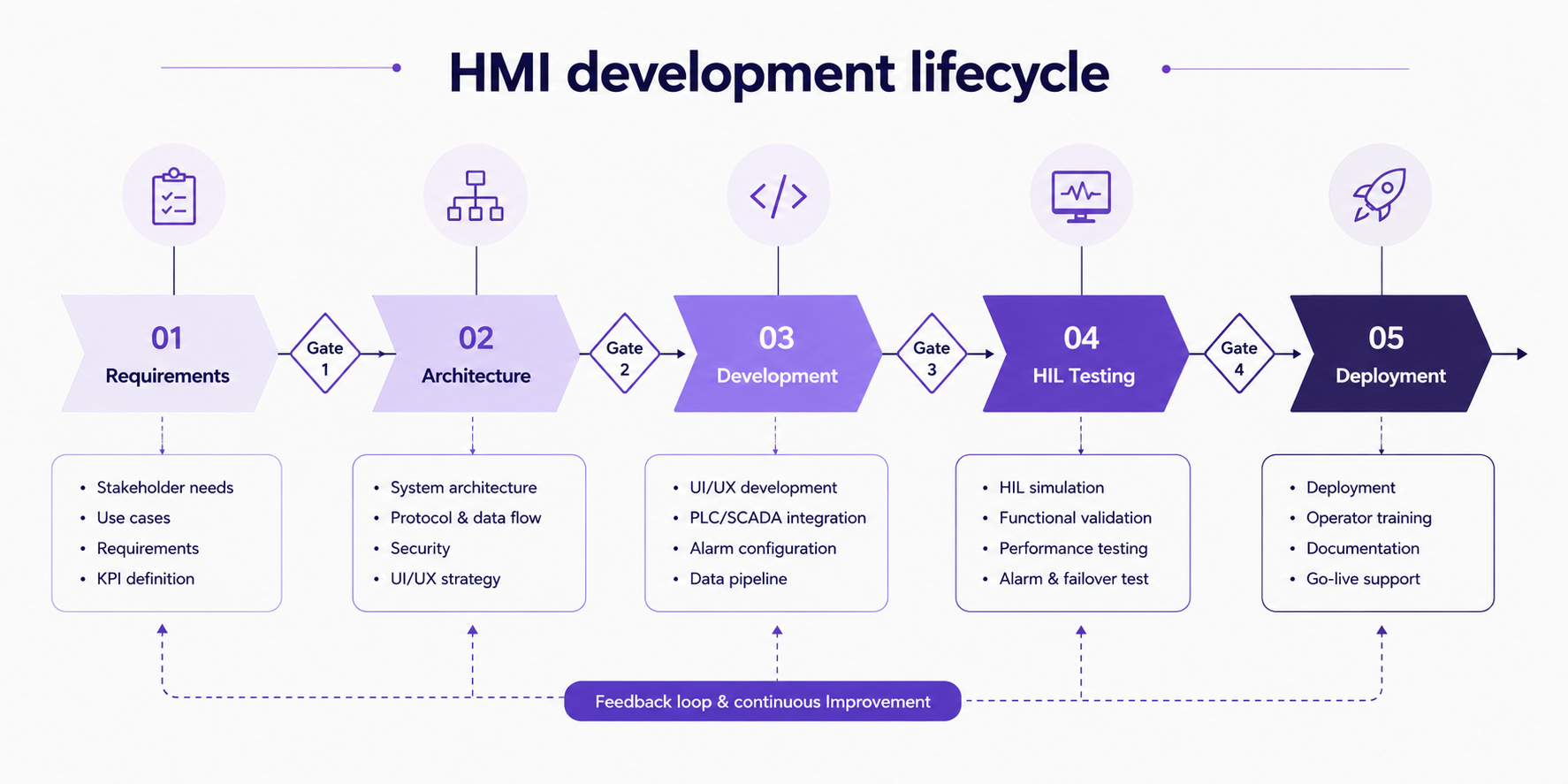
Phase 1 — Requirements Engineering: Control Logic Mapping, Operator Task Analysis
Requirements for HMI software must capture two parallel dimensions:
- Technical requirements: PLC tag lists, communication protocols, update rates, hardware targets, network topology
- Operational requirements: Operator task flows, alarm response procedures, shift handover workflows, training program inputs
Phase 2 — Architecture Design: Protocol Selection, Runtime Environment, Screen Hierarchy
Architecture decisions made in Phase 2 constrain every subsequent phase. Key decisions:
- Runtime environment (bare-metal / RTOS / Linux / web-based)
- Protocol stack (OPC UA / Modbus / EtherNet/IP / MQTT)
- Display hierarchy (navigation model, screen organization, alarming architecture)
- Redundancy and failover requirements
Phase 3 — Development: Widget Libraries, PLC Tag Binding, Alarm Configuration
Development in HMI projects combines traditional software engineering with control system integration:
- Widget libraries: Platform-specific (FactoryTalk, WinCC) or custom (Qt/QML, React components with WebSocket data binding)
- Tag binding: Mapping PLC data addresses to HMI display variables — error-prone when PLC tag lists change during development
- Alarm configuration: Priority assignment, deadband settings, shelving logic, alarm group hierarchy
Phase 4 — Hardware-in-the-Loop (HIL) Testing and Simulation Environments
HIL testing runs the HMI software against simulated PLC outputs before commissioning on live equipment. This catches:
- Protocol timing issues that only appear under realistic data rates
- Display rendering errors on the target hardware (not just development workstations)
- Alarm cascades that weren’t visible in requirements review
Skipping HIL testing to save time is a false economy. Bugs found during live commissioning in an operating plant cost 10–20x more to fix than bugs found in a simulation environment.
Phase 5 — Deployment, Commissioning, and Operator Training Programs
Commissioning includes not just software go-live but the operational transfer: operator acceptance testing, training program delivery, and documentation handover. HMI projects that treat training as an afterthought consistently underperform on adoption and safety metrics.
Agile vs. Waterfall for Safety-Critical HMI Projects
Waterfall aligns with formal safety certification processes (DO-178C, IEC 61508) where each phase must produce documented artifacts before the next begins. Non-negotiable in aerospace and safety-instrumented system HMIs.
Agile/iterative works well for visualization-layer HMIs where requirements evolve and operator feedback loops are valuable. Not appropriate where certification artifacts require phase-gate sign-off.
Many enterprise HMI projects use a hybrid: waterfall architecture and requirements phases, iterative development and testing sprints.
HMI Platform and Technology Stack Selection
Platform selection is one of the highest-leverage decisions in an HMI project. The wrong platform locks you into proprietary ecosystems, limits scalability, and drives up long-term maintenance cost.
Proprietary Platforms
- Rockwell FactoryTalk View: Best for Allen-Bradley / ControlLogix environments. Strong US market support. High licensing cost.
- Siemens WinCC: Deep integration with S7 PLC family. Enterprise-grade historian and reporting. Dominant in European and global manufacturing.
- Schneider EcoStruxure: Multi-site architecture support, strong energy sector presence, IIoT-ready architecture.
Open and Web-Based HMI
Inductive Automation Ignition is the most significant disruptor in the US industrial HMI market. Unlimited tag licensing, browser-based deployment, Python scripting, and strong OPC UA support have made it the default choice for modern US integrators and system architects.
Node-RED is popular for IIoT prototyping and lightweight HMI dashboards where visual programming is sufficient. Not suited for production safety-critical applications.
Custom Development Stacks
- Qt/QML: Industry standard for embedded and desktop HMI, C++ performance, strong GPU acceleration support
- C#/.NET with WPF/MAUI: Windows-focused HMI development, large talent pool in the US
- JavaScript + React + WebSockets: Web-based HMI dashboards, lower real-time performance ceiling but fast development cycles
HMI Platform Comparison Matrix for Industrial Software Development
| Platform | License Cost | Tag Scaling | Protocol Breadth | Best For |
| Rockwell FactoryTalk | High (per-tag) | Limited | AB-ecosystem native | Rockwell PLC environments |
| Siemens WinCC | High | Moderate | Siemens S7 native + OPC | Multi-site process plants |
| Schneider EcoStruxure | Moderate-High | Good | Multi-protocol | Energy + multi-vendor plants |
| Inductive Automation Ignition | Moderate (flat) | Excellent | OPC UA, MQTT, broad | Modern US manufacturing |
| Qt/QML custom | Dev cost only | Unlimited | Custom drivers | Embedded, automotive, custom |
| React + WebSockets | Dev cost only | Unlimited | Custom | Web HMI, dashboards |
Security and Compliance in Industrial HMI Systems
HMI endpoints are the most commonly targeted entry point for ICS cyberattacks. CISA advisories consistently identify internet-exposed HMI systems as critical vulnerabilities in US critical infrastructure. Security cannot be retrofitted — it must be designed in.
ICS/OT Cybersecurity Threats Specific to HMI Endpoints
CISA’s ICS advisories consistently identify the following HMI-specific threat vectors:
- Remote access exploitation: VPN and RDP exposure of HMI servers to internet-facing networks
- Default credential abuse: Factory-default usernames/passwords on HMI software installations
- Unpatched OS vulnerabilities: HMI systems running Windows XP or Windows 7 due to vendor certification constraints
- Supply chain risk: Third-party HMI integrators with persistent remote access beyond project completion
IEC 62443 Compliance for US Industrial Control Systems
IEC 62443 is the international standard for industrial automation and control system (IACS) cybersecurity. For US manufacturers, compliance is increasingly required by:
- Insurance underwriters for OT cyber coverage
- Government contracts (DoD, DOE supply chain requirements)
- Critical infrastructure operators (energy, water, transportation)
Remote Access Security: VPN, Zero-Trust Architecture, Encrypted HMI Sessions
Best practice for remote HMI access in 2026:
- No direct internet exposure of HMI servers under any circumstances
- MFA-enforced VPN as minimum baseline for remote access
- Zero-trust network architecture for enterprise HMI deployments: verify identity at every access request, no implicit trust for LAN-side devices
- Encrypted HMI sessions: TLS 1.3 for web-based HMIs, certificate-based OPC UA connections
FDA 21 CFR Part 11 for HMIs in US Pharmaceutical Manufacturing
HMIs deployed in FDA-regulated manufacturing environments must comply with 21 CFR Part 11, which governs electronic records and electronic signatures. Key HMI-specific requirements:
- Audit trails for all operator actions (setpoint changes, alarm acknowledgments)
- User authentication with role-based access control
- Tamper-evident electronic records
- System validation documentation (IQ/OQ/PQ)
Industrial HMI Compliance Framework Comparison
| Framework | Primary Sector | HMI Requirement Focus |
| IEC 62443 | All industrial | Network segmentation, Security Levels, access control |
| NIST CSF | US critical infrastructure | Identify, Protect, Detect, Respond, Recover functions |
| FDA 21 CFR Part 11 | Pharma / life sciences | Audit trails, e-signatures, system validation |
| NERC CIP | Energy / utilities | Cyber asset identification, access management |
| DO-178C | Aerospace / defense | Software lifecycle, verification, certification levels |
| ISA-101 | Process industries | Display design standards, alarm management |
Common HMI Software Project Failure Points
No HMI overview is complete without a frank discussion of why projects fail. These aren’t edge cases — they’re the recurring patterns that experienced integrators encounter across industries.
Failure 1: Skipping Operator Task Analysis in Requirements
Requirements documents filled with tag lists and protocol specifications are necessary but insufficient. The missing piece is always operator task analysis: the sequence of decisions an operator makes, the information each decision requires, and the time pressure under which decisions occur.
HMIs built without operator task analysis consistently fail acceptance testing and require expensive UI rework after deployment.
Failure 2: Protocol Mismatch Between HMI and Legacy PLC/SCADA Systems
Legacy PLC systems running Modbus RTU, DH+, or proprietary fieldbus protocols don’t communicate natively with modern HMI platforms designed around OPC UA or EtherNet/IP. Protocol conversion adds latency, complexity, and failure points.
The fix — protocol gateways or software adapters — works but must be planned and budgeted at architecture phase. Discovering the mismatch at integration phase is a schedule and cost crisis.
Failure 3: Inadequate Hardware-in-the-Loop Testing Before Commissioning
The gap between development-environment testing and live plant commissioning is where HMI bugs hide. HIL testing closes this gap, but many projects skip it under schedule pressure — and pay for it in extended commissioning cycles and post-deployment defect resolution.
Failure 4: Security Not Designed In — Retrofitting Cybersecurity Post-Deployment
Adding cybersecurity controls to a deployed HMI system is 3–5x more expensive than designing them in. Network segmentation, encrypted communications, and authentication layers require architectural decisions that cannot be easily retrofitted onto a running system.
CISA’s guidance is consistent: secure-by-design is not optional for new HMI deployments in critical infrastructure.
Failure 5: Scalability Ignored — Monolithic HMI That Cannot Extend to New Lines
Single-site, single-line HMI projects frequently become multi-site deployment requirements within 24 months of go-live. Monolithic HMI architectures — where screen templates, tag structures, and alarm configurations are hardcoded to one production line — cannot scale without effectively being rebuilt.
Template-driven development and modular architecture decisions made early in the project eliminate this failure mode almost entirely.
Scalability in Industrial HMI and Automation Systems
Enterprise HMI deployments don’t stay at pilot scale. The organizations that avoid rearchitecting their HMI infrastructure every 3–5 years are the ones that planned for scale from the start.
Modular HMI Design Patterns for Multi-Site US Manufacturing Operations
Modular design means building HMI screens, tag structures, and alarm configurations as reusable templates rather than one-off implementations. When a new production line is added, the template is instantiated with line-specific parameters rather than rebuilt from scratch.
This approach also supports consistent operator experience across sites — reducing training overhead when operators rotate between facilities.
Centralized vs. Decentralized HMI Architectures for Enterprise Scalability
Centralized: Single tag server and historian serving all display nodes. Simpler management, single point of failure risk. Suitable for single-site deployments with reliable network infrastructure.
Decentralized: Local tag servers at each site or line, synchronized to enterprise historian. More complex, more resilient. Required for multi-site deployments where local operations must continue during WAN outages.
Version Control and CI/CD Pipelines for HMI Software at Scale
HMI software is still code. Yet many organizations treat it as a configuration artifact managed by file copies on USB drives. At enterprise scale this creates:
- No audit trail for configuration changes
- No rollback capability when updates introduce defects
- No automated testing of configuration integrity before deployment
Modern HMI development teams apply git-based version control, automated configuration validation, and staged deployment pipelines to HMI software — the same practices that enterprise software teams apply to application code.
HMI Software Development Across US Industrial Sectors
HMI requirements vary significantly by sector. Compliance obligations, hardware constraints, communication protocols, and operator workflow patterns differ enough that sector experience — not just HMI platform expertise — matters in vendor selection.
HMI Software Requirements Across Industrial Sectors
| Sector | Key HMI Requirements | Primary Compliance | Common Platforms |
| Manufacturing / Smart Factory | OEE dashboards, line control, alarm management | IEC 62443, ISA-101 | Ignition, WinCC, FactoryTalk |
| Automotive / SDV | In-vehicle HMI, cockpit domain controller, AUTOSAR | ISO 26262, ASPICE | Qt/QML, custom embedded |
| Energy / Utilities | Substation HMI, grid monitoring, SCADA integration | NERC CIP, IEC 61850 | GE iFIX, Ignition, Wonderware |
| Aerospace / Defense | Ruggedized panels, DO-178C certified software | DO-178C, MIL-STD | Custom RTOS, proprietary |
| Healthcare / Medical | FDA-regulated medical device HMI, usability engineering | FDA 21 CFR Part 11, IEC 62366 | Custom, LabVIEW, proprietary |
| Pharma / Life Sciences | GMP manufacturing HMI, electronic batch records | FDA 21 CFR Part 11, GAMP 5 | Wonderware, custom validated |
Real-World Case Study: SML ISUZU ERP Viewer
The SML ISUZU ERP Viewer, developed by Code Brew Labs for one of India’s leading commercial vehicle manufacturers, demonstrates the same scalability and real-time visibility challenges seen in modern industrial HMI systems.
The platform was built to centralize operational data, improve cross-team workflow visibility, and support scalable enterprise reporting across devices and departments. Today, it serves 1,000+ employees with a 4.7/5 average rating while delivering real-time operational dashboards and role-based information access.
Many of the same architectural principles used in enterprise operational software — centralized data flow, scalable visualization layers, and real-time system visibility — directly apply to connected HMI and industrial automation environments.
HMI Software Development Costs and Engagement Models
What does HMI software development cost?
US market pricing benchmarks (2025–2026):
- Simple HMI ($10K–$15K): Single machine or line, off-the-shelf platform (Ignition, WinCC), limited compliance requirements, 30–60 day delivery.
- Mid-complexity HMI ($50K–$100K): Multi-line or multi-protocol integration, custom UI development, basic compliance (ISA-101, IEC 62443 baseline), 3–6 month delivery.
- Enterprise/safety-critical HMI ($150K+): Multi-site architecture, full safety certification (DO-178C, FDA 21 CFR Part 11), HIL testing, operator training program, phased commissioning. 6–18 month delivery.
Cost Drivers: What Actually Moves the Budget
- Compliance depth: FDA 21 CFR Part 11 validation documentation alone can add $20K–$40K to a project budget.
- Hardware targets: Custom embedded Linux HMI on proprietary hardware costs significantly more than deploying on a standard industrial panel PC.
- Protocol complexity: Legacy protocol integration (DH+, Profibus DP) requires specialized expertise and gateway hardware.
- Integration scope: Number of PLCs, historians, ERP systems, and external data sources feeding the HMI.
Build vs. Buy vs. Outsource — Decision Framework for US Industrial Buyers
Build in-house: Appropriate when your organization has sustained HMI development capability, long-term ownership requirements, and the project volume to justify a dedicated team. Rare outside large manufacturing enterprises.
Off-the-shelf platform: Right choice when your control systems match the platform’s native protocol ecosystem and your requirements fit standard widget libraries. Fastest time to deployment.
Custom development / outsourced: Optimal when hardware targets, compliance requirements, or UI specifications exceed platform capabilities — or when internal capability doesn’t exist. Key evaluation criteria: sector experience, compliance track record, and post-deployment support model.
Need enterprise software for industrial operations?
Benefits of Custom HMI Software Development
The case for custom HMI development versus off-the-shelf platforms isn’t about technology preference. It’s about fit-to-requirement:
- Unrestricted UI/UX design: Custom interfaces match operator workflows precisely, not the platform vendor’s widget library assumptions.
- Full protocol flexibility: Support any PLC, sensor, or communication protocol without depending on platform driver availability.
- IP ownership: Custom HMI software is organizational IP. Platform-built HMIs create licensing dependencies.
- Compliance tractability: Safety-certified HMIs (DO-178C, IEC 61508) are significantly easier to certify on controlled custom stacks than on commercial platforms with opaque software components.
- Long-term maintainability: No dependency on vendor licensing continuity or platform EOL decisions.
FAQs
Q1: What is HMI software development?
HMI software development is the process of designing and building operator interfaces that connect human users with machines, industrial control systems, PLCs, SCADA infrastructure, robotics, and embedded hardware.
It includes real-time visualization, control logic binding, alarm management, and compliance with industrial standards across sectors like manufacturing, energy, automotive, and healthcare.
Q2: What programming languages are used in HMI development?
The language stack depends on the deployment context:
- C/C++ for bare-metal and RTOS embedded HMIs;
- C#/.NET for Windows-based HMI platforms (WinCC, FactoryTalk);
- Qt/QML for embedded Linux panels;
- JavaScript/React with WebSockets for web-based HMIs;
- Python for scripting and analytics integration; and
- IEC 61131-3 structured text on the PLC side.
Q3: How much does custom HMI software development cost? US market benchmarks: Simple HMIs run $10K–$15K (single line, standard platform, no compliance requirements). Mid-complexity projects cost $50K–$100K (multi-protocol, custom UI, baseline compliance). Enterprise or safety-critical HMI development starts at $150K and scales with compliance depth, hardware targets, and integration scope.
Q4: What is the difference between HMI and SCADA?
HMI is the operator interface at the machine or production line level — direct interaction with PLCs and local control systems. SCADA is the supervisory layer above HMI: it aggregates data from multiple HMIs across a plant or multi-site operation, adds data historian functionality, and enables remote monitoring and command. An HMI shows you what is happening on one line. SCADA shows you what is happening across the entire operation.
Q5: What are the best HMI software platforms for US manufacturers?
- For Allen-Bradley PLC environments: Rockwell FactoryTalk View.
- For mixed PLC environments with web-first requirements: Inductive Automation Ignition.
- For Siemens-centric plants: Siemens WinCC.
- For custom embedded targets: Qt/QML.
Evaluation criteria: existing PLC ecosystem, network architecture, compliance requirements, and internal engineering capability.
Q6: How is AI being integrated into HMI systems in 2026?
Predictive maintenance overlays surfaced directly in operator displays, AI-driven alarm filtering to reduce alarm fatigue, NLP-based operator query interfaces for diagnostic data, edge inference on embedded displays for real-time anomaly detection, and AR field service overlays combining spatial computing with live equipment data from the HMI data layer.
Q7: What compliance standards apply to HMI software in the US?
- IEC 62443: Industrial control system cybersecurity — applicable across sectors
- ISA-101: Display design standard for industrial HMI interfaces
- FDA 21 CFR Part 11: Electronic records and signatures for pharmaceutical/life sciences HMIs
- NERC CIP: Cybersecurity for bulk electric system control systems
- DO-178C: Software certification for airborne systems HMIs
- IEC 62366: Usability engineering for medical device HMIs
Q8: What are the most common reasons HMI software projects fail?
Skipping operator task analysis in requirements, protocol mismatches with legacy PLC systems discovered during commissioning, inadequate hardware-in-the-loop testing, security designed as a retrofit rather than a foundational requirement, and monolithic architecture that cannot scale to additional production lines without full redevelopment.
Final Words
HMI software projects succeed or fail in the first three weeks — during requirements engineering and architecture design. Getting the data model, protocol strategy, and scalability patterns right before a line of code is written matters more than platforms, screen designs, or feature sets.
At Code Brew Labs, the focus is on building scalable industrial, embedded, and enterprise-grade software systems designed for long-term operational reliability and growth.
Planning an industrial HMI project?
Let's Convert Your Business Idea Into Success!
Free Consultation from Top Industry Experts
Let’s Build Your Dream App!
Share article on :



Ready To Fuel Your Vision With AI-Powered Innovation?


Level- 18, Dubai World Trade Centre Tower, Sheikh Rashid Tower, Sheikh Zayed Rd, Dubai, UAE
business@code-brew.com +971-55-645-7972
Plot no I - 36, Sector 83 Alpha, Mohali SAS Nagar 140308
business@code-brew.com +91-771-976-8427
Av. Miguel Hidalgo y Costilla 1995, Arcos Vallarta, 44600 Guadalajara, Mexico
business@code-brew.com +1(213)2614953
4231 Balboa Ave #512 San Diego, CA 92117 United States
business@code-brew.com +1(213)2614953
2nd floor, College House, 17 King Edwards Rd, London HA4 7AE, UK
business@code-brew.com +44 (20) 82644493
Partner With Experts Who Leverage AI & Tech To Transform Ideas Into Market-Leading Solutions.
Wait! Looking for Right Technology Partner For Your Business Growth?
It's Time To Convert Your Business Idea Into Success!
Get Free Consultation From Top Industry Experts:
I would like to keep it to myself