Modernized a Fleet Management App for a Jeddah Logistics Company to Improve Vehicle Utilization by 32%

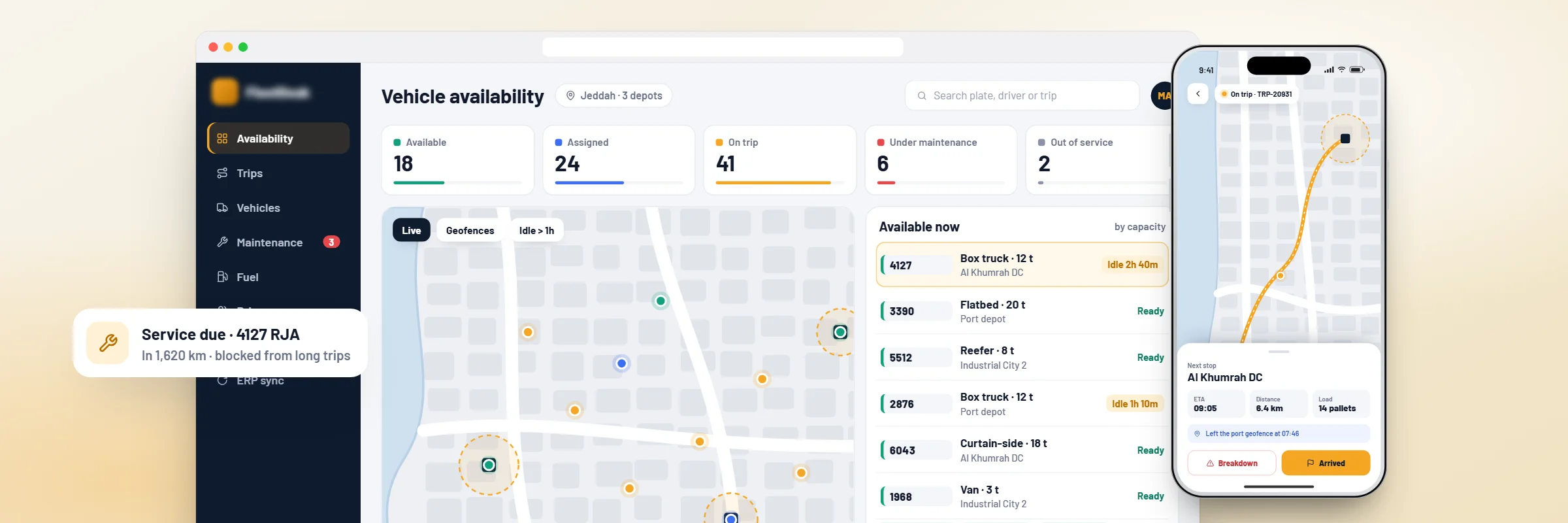
Fleet management console with vehicle availability by status, beside the driver app on a trip

Project Overview

A logistics company in Jeddah was using an outdated fleet management solution, but still relied on spreadsheets to manage vehicle availability. Sometimes, trucks had already completed their trips but were still marked as busy in the system. As an outcome, some trucks received a lot more assignments while others remained unused.

The company wanted to improve its existing app without replacing the ERP used for billing and transport orders. Code Brew Labs modernized the app’s vehicle availability logic, GPS integration, trip allocation, maintenance scheduling, fuel tracking, driver app, and ERP integration. Fleet managers can now check vehicle availability and usage in one place. Fleet utilization reports showed a 32% relative improvement during the six-month period after deployment, compared with the agreed pre-launch baseline.

Business Challenges

  • Vehicles remained busy after returning

    A truck could return to the depot and still appear busy in the system. Dispatchers had to call drivers to confirm availability before assigning another trip. This delayed vehicle allocation and left some trucks waiting unnecessarily.

  • Maintenance depended on someone remembering

    Maintenance was recorded with dates in the workshop records and spreadsheets. Not all dispatch crews were always aware if a vehicle was due for service or not.

  • GPS data wasn't connected to daily work

    The old app displayed the location of a truck. Dispatchers could see where a truck was, but they couldn't tell whether it was making a delivery or waiting for another trip.

  • Weekly reports took hours to prepare

    Fleet usage figures came from dispatch, while repair and service information came from the workshop. Someone had to combine both before the report could be shared.

Our Solution

The old app depended on manual status updates. A truck could finish its trip and still appear unavailable to dispatchers. We changed how vehicle status was recorded. The updated system checks completed trips and maintenance restrictions before marking a vehicle as available.

  • PostgreSQL stores vehicle details and assignment history
  • Vehicle states include available, assigned, on trip, under maintenance and out of service
  • Dispatchers can search by vehicle type and load capacity
  • Overlapping assignments are blocked
  • Every status change records the responsible user and timestamp
The company already had GPS devices. We retained the current tracking setup and changed how the app used the location details.

Previously, the map showed the positions of vehicles without context. The updated dashboard displays tracking information alongside the assigned trip.

  • GPS data received through compatible telematics provider APIs
  • Latest vehicle location displayed on Google Maps
  • Trip start and completion events linked to vehicle movement
  • Depot entry and exit recorded through geofencing
  • Extended stops flagged for review
  • Route deviations visible against the assigned journey
  • Historical location records available to authorized managers

Tracking updates are delivered to the web console through WebSockets. The dashboard uses the latest available device information rather than assuming that every vehicle is reporting continuously.

The dispatch team had been relying on familiar vehicles when assigning trips. That worked on quieter days, but it left some trucks underused when shipment volumes increased.

We introduced allocation checks into the existing dispatch workflow. Before confirming a trip, the fleet management app checks vehicle availability and load capacity. It also checks whether the proposed assignment overlaps with another journey.

  • Existing trip schedule verification
  • Reassignment when a vehicle becomes unavailable
  • Daily and weekly vehicle usage reports
  • Idle vehicles highlighted in the dispatch console

Utilization reporting was configured around the company's agreed measurement method. Managers could compare actual vehicle usage instead of relying only on the number of trips completed.

This gave fleet managers a better way to identify vehicles that were spending too much time without assignments. Dispatchers could also check capacity and existing bookings before assigning another trip. It reduced the need to make allocation decisions using separate spreadsheets.

Drivers had an older mobile interface that wasn't well suited to reporting problems during a trip. Some updates were still sent through phone calls and messages.

We changed the app around the tasks drivers handled most often. They could check their assigned vehicle and report trip progress without moving between different screens.

  • Daily assignments with vehicle details and pickup instructions
  • Trip start and completion updates
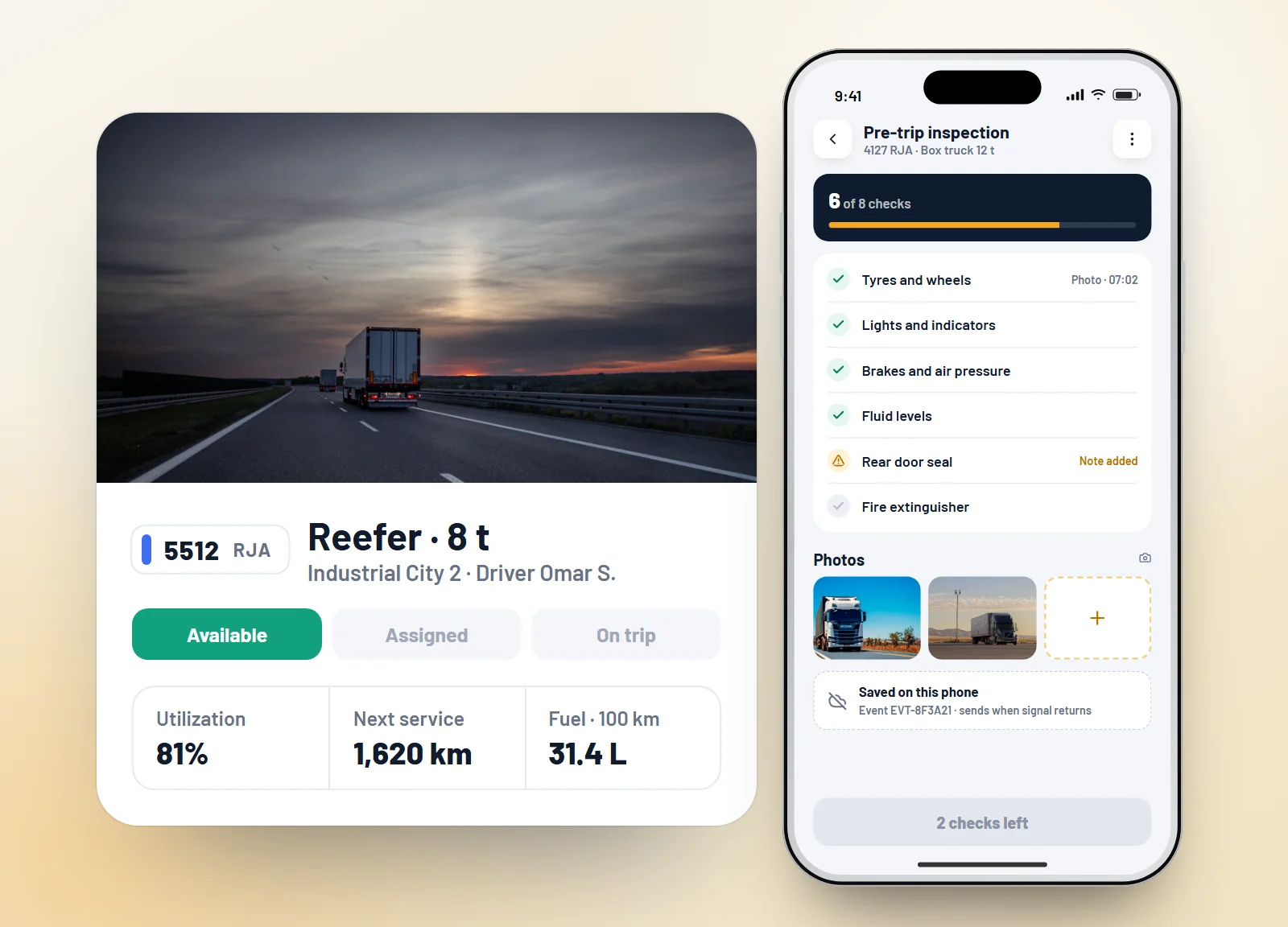
  • Pre-trip inspections with photographs
  • Breakdown reports and driver notes
  • Offline updates when mobile coverage drops

SQLite stores pending updates on the device. Once the connection returns, the app sends those records to the backend.

Each submission carries a unique event ID. Repeated uploads are checked so the same inspection or trip update isn't recorded twice.

Fuel expenses were being reviewed separately from trip activity. That made it difficult to identify which vehicles were consuming more fuel than expected.

We connected fuel transaction records with vehicle IDs and completed journeys. The application calculates consumption indicators using the fuel and distance information available.

  • Distance travelled between refuelling events
  • Consumption reports by vehicle
  • Unusual fuel usage flagged for investigation
  • Monthly fuel cost summaries
  • Expense information shared with the ERP where supported

The system does not automatically label unusual consumption as misuse. Fleet managers can review the trip history and fuel records before deciding whether further checks are needed.

Completed trip counts didn't explain much about how a vehicle had been operated. Managers needed more information when investigating delays or repeated idle periods.

The modernized application uses available GPS and telematics events to prepare driver activity reports.

  • Completed trips and idle time by driver
  • Route deviations and extended stops
  • Driver-reported incidents
  • Weekly driver activity reports

The reports help managers review particular trips and identify where additional driver training may be useful.

We configured background jobs to check fleet activity and send alerts according to the event type.

  • Upcoming vehicle service reminders
  • Overdue maintenance alerts
  • Extended idle vehicle notifications
  • Vehicle breakdown reports
  • Depot geofence events
  • Changes to trip assignments
  • Scheduled fleet utilization reports

Redis and BullMQ manage these jobs. Repeated events are checked to avoid sending the same alert several times. The alerts helped dispatchers see when a vehicle needed maintenance before assigning it to another delivery. Fleet managers could also follow up on overdue service records without checking workshop spreadsheets separately.

The ERP was not replaced during modernization. It remained responsible for transport orders and financial records.

We updated the integration between the fleet app and the ERP so that vehicle assignments and completed trip information could be linked to the relevant transport order.

  • Transport order references imported through APIs
  • Trip IDs linked to existing order records
  • Completed journey information returned to the ERP
  • Fuel and maintenance expenses shared where supported
  • Failed requests placed in retry queues
  • Duplicate updates checked before processing
  • Integration errors recorded for support teams
Vehicle profile with status and service details, and the driver pre-trip inspection with photos
Fleet console on a laptop cycling through the results: utilization, availability, maintenance and reports

Technology Stack

  • Mobile App

    React Native

    Why We Chose It

    Updated driver workflows for iOS and Android

  • Fleet Web Console

    React

    Why We Chose It

    Vehicle allocation and maintenance monitoring

  • Backend

    Node.js, REST APIs

    Why We Chose It

    Fleet operations and ERP communication

  • API Management

    AWS API Gateway

    Why We Chose It

    API access and request controls

  • Database

    PostgreSQL

    Why We Chose It

    Vehicle, trip and maintenance records

  • GPS Integration

    Telematics Provider APIs

    Why We Chose It

    Vehicle location and activity information

  • Real-Time Updates

    WebSockets

    Why We Chose It

    Live vehicle status updates

  • Maps

    Google Maps Platform

    Why We Chose It

    Fleet locations and trip visualization

  • Queue System

    Redis with BullMQ

    Why We Chose It

    Maintenance alerts and background processing

  • Offline Storage

    SQLite

    Why We Chose It

    Driver updates during network interruptions

  • File Storage

    Amazon S3

    Why We Chose It

    Inspection photographs and workshop documents

  • Authentication

    OAuth 2.0

    Why We Chose It

    Token-based access for authorized users

  • Cloud

    AWS EC2, RDS, S3, CloudWatch

    Why We Chose It

    Application hosting and monitoring

  • Observability

    OpenTelemetry, structured logs

    Why We Chose It

    Tracking integration failures and application errors

Saudi Market Requirements and Integrations

  • Saudi National Address

    Standardized location details supported depot and delivery records.

  • Arabic and English

    The driver app and fleet dashboard supported bilingual interfaces with Arabic RTL layouts.

  • Google Maps Platform

    Used to display vehicle locations and assigned routes across Saudi Arabia.

  • Saudi Mobile Number Support

    Driver contact information and notifications supported the +966 country code.

  • Saudi Working Calendar

    Maintenance schedules and operational reporting used configured working days and public holidays.

  • ERP Integration

    Transport orders and completed trip records remained connected to the company's existing business software.

  • PDPL-Aligned Data Handling

    Driver information and location history were subject to role-based access and retention controls.

Development Process

  1. Existing Application Review

    We reviewed the fleet app and checked where vehicle information became outdated. The team also identified tasks that dispatchers were still managing through spreadsheets.

  2. Data Correction and Architecture Planning

    Duplicate vehicle records and incomplete maintenance histories were reviewed with the fleet team. We planned the changes around the company's existing ERP and GPS provider.

  3. Vehicle Availability and Allocation Updates

    Vehicle status rules were rebuilt to account for completed trips, overlapping assignments and maintenance restrictions. These workflows were tested before updating other fleet functions.

  4. GPS and Driver App Modernization

    We connected tracking events with trip records and updated driver reporting. Offline synchronization was tested to check how the app handled interrupted connections and repeated submissions.

  5. ERP Integration and System Testing

    Transport orders and completed trip records were checked against the ERP. We also tested failed API requests and duplicate updates.

  6. Pilot Testing and Phased Rollout

    A selected group of vehicles used the updated system first. Dispatchers compared dashboard information with actual depot records. Additional vehicles were added after the initial checks, and fleet managers received training.

Measurable Results

  • Vehicle utilization improved by 32% after six months of rollout

  • Unassigned vehicle idle time decreased by 38%

  • Manual vehicle availability checks fell by 71%

  • Missed scheduled maintenance events decreased by 64%

  • Fleet report preparation went from 4 hours to under 15 minutes

  • Vehicle allocation errors decreased by 53%

  • 96% of active fleet trips became visible in the operations dashboard

  • Maintenance-related vehicle downtime decreased by 27%

Client Testimonial

— Fleet Operations Manager, Logistics Company, Jeddah

We worked with Code Brew Labs to improve our old fleet management app. Earlier, our team had to check spreadsheets and call drivers to find available trucks. Now, we can track vehicles, assign trips and manage maintenance in one place. It has made our daily work much easier and saved our team a lot of time.

Running a fleet on spreadsheets or an outdated app?

Book a free 30-minute fleet workflow review. We’ll identify where vehicle status, maintenance, and trip data are falling out of sync, and what you can fix without replacing your ERP.

Get a Free Quote
Contact Us

Ready To Fuel Your Vision With AI-Powered Innovation?

Our Presence

Level- 18, Dubai World Trade Centre Tower, Sheikh Rashid Tower, Sheikh Zayed Rd, Dubai, UAE

business@code-brew.com +971-55-645-7972

Plot no I - 36, Sector 83 Alpha, Mohali SAS Nagar 140308

business@code-brew.com +91-771-976-8427

Al Akaria 2, 6926 Olaya Street, RHOA2566, Riyadh, Saudi Arabia.

business@code-brew.com

Av. Miguel Hidalgo y Costilla 1995, Arcos Vallarta, 44600 Guadalajara, Mexico

business@code-brew.com +1(213)2614953

4231 Balboa Ave #512 San Diego, CA 92117 United States

business@code-brew.com +1(213)2614953

2nd floor, College House, 17 King Edwards Rd, London HA4 7AE, UK

business@code-brew.com +44 (20) 82644493

Partner With Experts Who Leverage AI & Tech To Transform Ideas Into Market-Leading Solutions.

Wait! Looking for Right Technology Partner For Your Business Growth?

It's Time To Convert Your Business Idea Into Success!

Get Free Consultation From Top Industry Experts:
gif
I would like to keep it to myself