In recent years, applications have evolved from simple digital tools into intelligent assistants capable of understanding, reasoning, and interacting with users in a more human-like manner. Among the technologies leading this transformation is conversational AI, which enables apps to communicate naturally using everyday language rather than rigid commands.
Table of Content
At the forefront of this change is ChatGPT, developed by OpenAI, a company known for pushing the boundaries of artificial intelligence research. ChatGPT is more than just a chatbot — it’s a flexible, AI-powered conversational model that can be integrated into a wide variety of platforms and use cases, from customer support and content generation to education and automation.
This blog aims to walk you through everything you need to know about integrating ChatGPT into your application — what it is, why it’s valuable, and how you can bring it into your product or business workflow effectively.
Whether you’re a developer exploring OpenAI’s API, a startup looking to enhance your product with AI-driven features, or an established business planning to automate communication and improve customer experiences, this guide will help you understand the fundamentals and best practices for using ChatGPT as part of your app ecosystem. And if you’re looking to speed up the process or ensure seamless implementation, you can always hire ChatGPT developers with the right expertise to integrate and optimize the model for your unique business needs.
ChatGPT is an AI-based conversational model developed by OpenAI that’s designed to generate text responses that sound remarkably human. It builds on a technology called Generative Pre-trained Transformer (GPT) — a deep learning model trained on vast amounts of text data to understand and generate natural language.
At its core, ChatGPT uses natural language processing (NLP) to interpret user input, recognize intent, and craft relevant responses. This allows it to hold conversations, answer questions, summarize content, brainstorm ideas, write code, and even assist with decision-making — all through simple text-based interaction.
OpenAI has released several iterations of the GPT model, each improving on accuracy, reasoning, and speed:
These models are accessible through the OpenAI API, which developers can use to embed ChatGPT’s capabilities into web, mobile, and desktop applications. Integration is straightforward — by connecting your app to the API endpoint, you can send user input to ChatGPT and receive intelligent responses in real time.
When a user types a message or question, ChatGPT processes it using complex layers of neural networks trained to recognize patterns in language. It doesn’t just retrieve prewritten answers — it generates new text dynamically, predicting the most likely and contextually appropriate next word or phrase based on the prompt.
ChatGPT’s versatility has made it a go-to AI solution across multiple industries:
In essence, ChatGPT bridges the gap between human communication and digital intelligence, allowing businesses to build applications that are not only functional but conversational, intuitive, and engaging.
Bonus Read: How to Hire ChatGPT Developers in 2025: A Step-by-Step Guide
Integrating ChatGPT into your application is not just about adopting the latest technology — it’s about creating smarter, more personalized, and efficient digital interactions. As users increasingly expect real-time, intelligent responses, businesses that embrace AI-powered conversational systems gain a significant advantage in both engagement and efficiency.
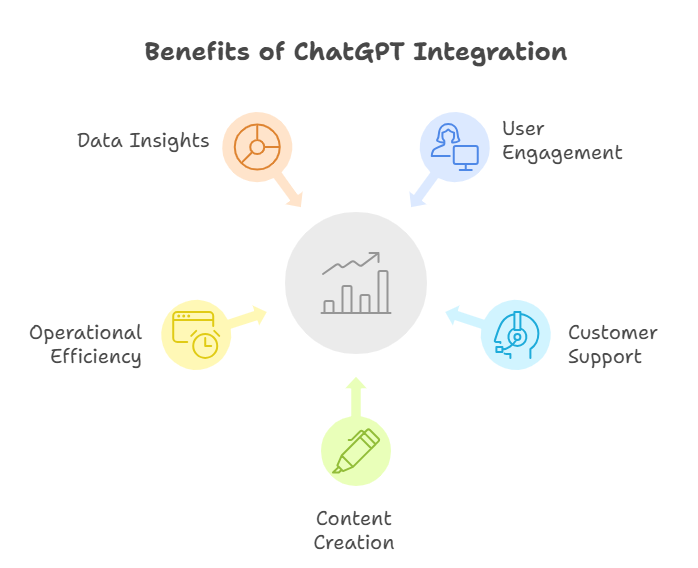
ChatGPT enables organizations to move beyond static interfaces and traditional automation tools. It introduces a conversational layer that can interpret intent, provide context-aware responses, and deliver information in a human-like manner. By leveraging this capability, businesses can elevate customer interactions, streamline operations, and stand out in competitive markets.
ChatGPT’s adaptability makes it suitable for organizations of all sizes. Startups can integrate it to automate customer communications and scale faster, while enterprises can embed it into internal systems to optimize productivity and decision-making. The technology aligns seamlessly with modern digital transformation goals — driving growth, efficiency, and user satisfaction simultaneously.
ChatGPT transforms traditional interfaces into dynamic, two-way conversations. It allows users to communicate naturally and intuitively, improving satisfaction and retention. Whether guiding customers through processes or assisting users in real time, it makes applications more interactive and user-centric.
Integrating ChatGPT enables businesses to deliver round-the-clock assistance without human intervention. The model can handle large volumes of queries simultaneously, ensuring consistent, accurate, and instant responses. This level of automation enhances service quality while reducing the operational burden on human teams.
ChatGPT’s ability to understand context allows it to generate content rapidly — from product descriptions and marketing text to support documentation. It can adapt tone and style to different audiences, making personalization at scale both achievable and efficient.
Automation through ChatGPT reduces the need for repetitive manual work. Managing routine queries and generating content automatically saves teams valuable time and lowers support costs, allowing human resources to focus on higher-value strategic activities.
ChatGPT can analyze user inputs, identify behavioral trends, and surface valuable insights that inform business strategy. When integrated with analytics or CRM systems, it supports data-driven decision-making and helps organizations continuously refine their services.
Organizations adopting ChatGPT often experience measurable improvements in user engagement, faster response times, and reduced operational costs. Startups can scale with limited manpower by automating communication flows, while larger enterprises use ChatGPT to enhance workflows, optimize support operations, and increase overall efficiency.
The result is not just cost savings but also stronger customer relationships and higher productivity across the business ecosystem.
Integrating ChatGPT into your product ecosystem can be approached in several ways depending on your technical infrastructure, goals, and desired level of customization. Each approach offers flexibility in deployment and scalability to match your organization’s needs.
The most direct method of bringing ChatGPT into your application is through the OpenAI API. This interface allows developers to connect ChatGPT’s capabilities with web, mobile, or desktop platforms securely and efficiently.
Integration typically involves authenticating with an API key, sending user prompts, and receiving AI-generated responses that can be displayed within your application. The API supports flexible configurations for prompt design, model selection, and response formatting — giving you complete control over how the AI interacts with your users.
This approach is ideal for organizations seeking full customization, higher data control, and the ability to integrate ChatGPT seamlessly into their backend architecture.
For businesses looking to streamline development, ChatGPT can also be integrated using plugins or third-party SDKs. Platforms such as LangChain, Zapier, and similar tools provide pre-built connectors that simplify the process of embedding ChatGPT into existing systems.
This approach suits teams that want rapid deployment without building everything from scratch. It enables quick automation across popular platforms while maintaining access to ChatGPT’s full conversational capabilities. However, for advanced security or extensive customization, a direct API connection remains the preferred choice.
Mobile applications can integrate ChatGPT through secure backend communication. The mobile interface sends user input to a backend service, which processes it through the ChatGPT model and returns an AI-generated response.
The success of such integrations depends heavily on user experience (UX) design. Since users expect smooth and intuitive interactions, elements like chat flow, contextual prompts, and response presentation play a crucial role. Optimizing these aspects ensures that the integration feels natural and responsive to mobile users.
ChatGPT can be embedded into web applications and SaaS platforms to power intelligent chat interfaces, virtual assistants, or automated content modules.
The integration process generally involves connecting the frontend and backend systems so user queries can be processed and responded to in real time. Businesses often use this setup to offer conversational customer support, assist users with navigation, or generate insights within dashboards.
For SaaS companies, ChatGPT becomes a value-adding feature that improves user engagement and differentiates the platform from competitors.
Enterprises often require deeper integration of ChatGPT into their internal systems, such as CRMs, ERPs, HR platforms, or data management tools. These integrations extend beyond customer interaction — they enhance internal workflows, automate document generation, and provide analytical insights.
By combining ChatGPT with enterprise automation frameworks, organizations can build AI-powered assistants that retrieve information, summarize reports, and streamline decision-making. Such implementations not only improve internal productivity but also enable businesses to respond to data-driven opportunities with agility and precision.
Integrating ChatGPT successfully requires more than simply connecting to an API — it involves thoughtful design, technical optimization, and an ongoing improvement process. To ensure consistent performance and a high-quality user experience, developers and businesses should follow several best practices during and after implementation.
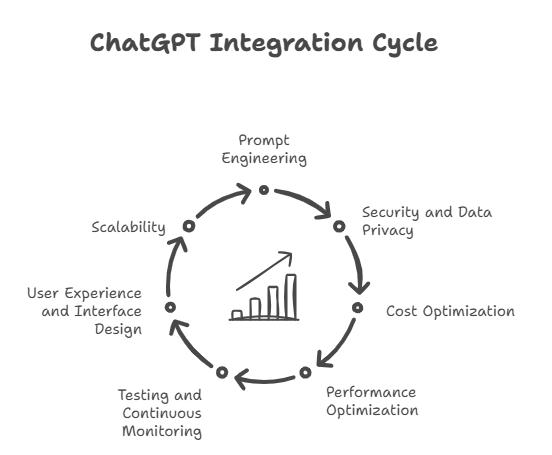
Prompt engineering is the foundation of effective ChatGPT integration. Since the model’s output depends heavily on how queries are structured, crafting clear, specific, and context-rich prompts ensures that responses align with user expectations.
Instead of relying on vague or open-ended instructions, define roles, objectives, and constraints within prompts. For instance, prompts that specify tone (“respond formally” or “explain in simple terms”) or purpose (“summarize this document for an executive audience”) produce more accurate results. Over time, analyzing user interactions can help refine prompt design for improved precision and consistency.
Protecting sensitive data should always be a top priority when integrating AI models into your applications. Businesses must ensure that API keys are securely stored, typically through environment variables or encrypted configuration systems, to prevent unauthorized access.
Additionally, user data transmitted to and from the API should be handled responsibly — anonymized whenever possible and compliant with relevant privacy regulations such as GDPR or CCPA. Establishing transparent data policies builds trust and ensures that users remain comfortable interacting with AI-driven systems.
Each interaction with ChatGPT consumes tokens, which directly affects usage costs. To maintain cost efficiency, developers can manage token consumption by controlling prompt length, adjusting response limits, and selecting the right model tier.
For instance, lightweight use cases such as FAQs or simple chat flows may not require the most advanced model. Choosing the appropriate version (like GPT-4 Turbo instead of GPT-4) can help balance performance and budget. Monitoring usage analytics also enables organizations to forecast costs more accurately and optimize resource allocation.
Performance plays a vital role in delivering a seamless conversational experience. Reducing latency ensures users receive responses quickly and naturally. This can be achieved through caching frequent responses, minimizing unnecessary API calls, and distributing requests efficiently.
It’s equally important to handle rate limits gracefully — by implementing retry mechanisms, queue management, or adaptive throttling — to prevent service interruptions during periods of high demand.
Once integrated, ChatGPT’s performance should be continuously evaluated. Regular testing helps identify areas where prompts may produce inconsistent or irrelevant outputs. Feedback loops, both automated and user-driven, are essential for ongoing improvement.
Periodic reviews of interaction logs can reveal patterns in user behavior or highlight recurring issues, enabling fine-tuning that enhances both accuracy and engagement.
Even the most powerful AI can fail to impress if the user experience is poorly designed. When integrating ChatGPT, focus on creating an interface that feels intuitive and responsive.
Provide users with clear instructions or placeholder text to guide interactions. Use visual cues such as typing indicators or structured message formatting to make responses easier to follow. Implement fallback responses or error messages for situations when the AI cannot provide a satisfactory answer — ensuring the experience remains seamless and transparent.
As usage grows, scalability becomes crucial to maintaining reliability. Designing your integration to support multiple users or concurrent sessions efficiently ensures that performance remains stable under heavy load.
This can be achieved through techniques such as load balancing, request queuing, and efficient session management. Planning for scalability from the start helps prevent performance bottlenecks and allows your ChatGPT-powered solution to grow alongside your user base.
ChatGPT’s influence extends across industries — from education and e-commerce to productivity and customer support. Several global brands have integrated OpenAI’s conversational technology into their products, redefining how users interact with digital platforms.
Duolingo has integrated ChatGPT to create interactive language learning experiences. The AI acts as a conversational partner, allowing users to practice dialogues in real-world scenarios. This personalization makes learning more engaging and adaptive to each user’s pace and proficiency.
Shopify employs ChatGPT within its merchant tools to enhance customer support and communication. By automating responses to common queries and providing AI-generated assistance, Shopify merchants can manage customer interactions more efficiently and improve response quality without expanding support teams.
Snapchat introduced “My AI,” a ChatGPT-powered feature that allows users to interact with a digital assistant within the app. It provides conversational recommendations, creative ideas, and friendly interactions — all designed to make user engagement more personal and entertaining.
Khan Academy has developed an AI-powered tutor built on ChatGPT, offering personalized educational support. The system helps students understand complex topics through guided explanations and interactive learning sessions, making quality education more accessible.
Productivity platforms like Notion and Slack have embedded ChatGPT to enhance content creation and streamline workflow communication. Notion AI assists users in writing, summarizing, and organizing content effortlessly, while Slack GPT brings conversational intelligence to workplace collaboration — summarizing messages, drafting updates, and automating repetitive tasks.
What unites these implementations is their focus on enhancing engagement through intelligent interaction. Each brand leverages ChatGPT’s natural language understanding to deliver experiences that feel less like using a tool and more like having a meaningful conversation.
By adopting ChatGPT, these companies demonstrate how AI can blend seamlessly into everyday digital experiences — making apps more adaptive, helpful, and human-centered.
While integrating ChatGPT can significantly elevate your application’s capabilities, there are a few common pitfalls that can affect its reliability, performance, or user trust. Avoiding these mistakes ensures a smoother, more secure, and cost-effective deployment.
Integrating ChatGPT into your application is no longer an experimental idea — it’s a strategic step toward building intelligent, responsive, and user-centric digital experiences. From automating customer interactions to powering personalized recommendations and real-time assistance, ChatGPT delivers tangible business value across industries.
However, the key to success lies in balancing innovation with responsibility. Developers must prioritize security, transparency, and user experience while exploring the full potential of conversational AI. As the technology continues to evolve, businesses that adapt early gain a clear competitive edge.
At Code Brew Labs, we help brands integrate AI-powered solutions like ChatGPT into their apps, websites, and digital ecosystems — driving smarter engagement, automation, and growth.
Ready to build an intelligent, AI-driven application? Contact Code Brew Labs today to get started.
Q1. How much does it cost to integrate ChatGPT into an app?
The cost depends on usage volume, model selection, and response length. OpenAI’s API operates on a pay-as-you-go model, typically ranging from a few cents per thousand tokens. Businesses can start small and scale based on demand while tracking costs through the OpenAI dashboard.
Q2. Which programming languages can I use?
ChatGPT can be integrated using any language capable of making HTTP requests, such as Python, Node.js, Java, Ruby, or PHP. OpenAI provides SDKs and extensive documentation to support developers across platforms.
Q3. Is ChatGPT safe to use with user data?
Yes, provided you follow data security best practices. Never send sensitive personal or financial data in prompts, and ensure compliance with privacy laws like GDPR or CCPA. OpenAI does not use API data to train its models unless explicitly opted in.
Q4. Can ChatGPT work offline or without the internet?
No. ChatGPT operates through cloud-based APIs, meaning an active internet connection is required for communication with OpenAI’s servers. For offline functionality, businesses can consider fine-tuned or locally hosted language models, though they may offer reduced capabilities.
Q5. How do I customize ChatGPT responses for my brand voice?
You can fine-tune the conversation style through well-crafted system prompts that guide the model’s tone, formality, and personality. Consistent instruction and prompt engineering help align responses with your brand’s communication standards and target audience.


 Contact Us
Team Up With Us Today For An Unforgettable Service Experience












 Book Free Consultation