Table of Content
Most cloud app development companies guide you through the same three bullet points about scalability, then bury you in technical terms. This guide will work differently.
This guide comes from Code Brew Labs’ engineering desk. By the end, you will know what cloud apps cost in 2026, how the build process works, which platform decisions actually matter, and where most budgets quietly break.
A cloud-based app runs on remote servers and delivers its interface and data over the internet. Users access it from any device, without installing anything locally.
Not all cloud apps are built the same way. There is a real difference between cloud-native and cloud-enabled.
Building cloud-native from day one gives you the cleanest architecture. Migrating a legacy system onto cloud infrastructure without rethinking its design often creates more problems than it solves.
Cloud-Native vs. Cloud-Enabled vs. Legacy Migration
| Approach | What It Means | Best For | Risk Level |
| Cloud-native | Built from scratch for cloud infrastructure using microservices or serverless | New products, startups, SaaS platforms | Low (if planned well) |
| Cloud-enabled | Existing app refactored or rehosted on the cloud | Mid-stage products moving off on-premise | Medium |
| Legacy migration | Moving a traditional monolith to the cloud with minimal changes | Enterprises with existing software debt | High without a proper architecture review |
Global public cloud spending hit $723 billion in 2025, a 21.5% jump from the year before. Gartner expects it to cross $947 billion by 2026.
More than 89% of organizations now use multi-cloud strategies. Only 8% still rely on a single cloud provider, according to the Flexera 2026 State of the Cloud Report.
The driver is not trend-following. Businesses that moved infrastructure to the cloud cut their Total Cost of Ownership by up to 40%, according to Accenture’s Cloud Value research.
These numbers matter for any business evaluating whether to build in the cloud right now. The window where cloud gives you a competitive edge over on-premise competitors is still open, but it is narrowing.
Before choosing a development approach, you need to understand what you are actually building. Three service models exist, and they serve completely different purposes.
Table 2: SaaS vs. PaaS vs. IaaS — Who Should Build What
| Built Model | What You’re Building | Who Manages Infrastructure | Real World Examples | Best For |
| SaaS | A product delivered entirely over the internet | Your cloud provider handles all of it | Salesforce, Slack, Figma | B2B software products, subscription apps |
| PaaS | A custom app on top of a managed platform | Split between you and the provider | Heroku, Google App Engine, AWS Elastic Beanstalk | Developers who want to focus on code, not servers |
| IaaS | Your own infrastructure, fully virtualized | Mostly your team | AWS EC2, Azure VMs, Google Compute | High-control enterprise systems, big data workloads |
Most Code Brew Labs’ client builds live in the SaaS or PaaS space. IaaS becomes relevant when compliance requirements or data volume demand full infrastructure control.
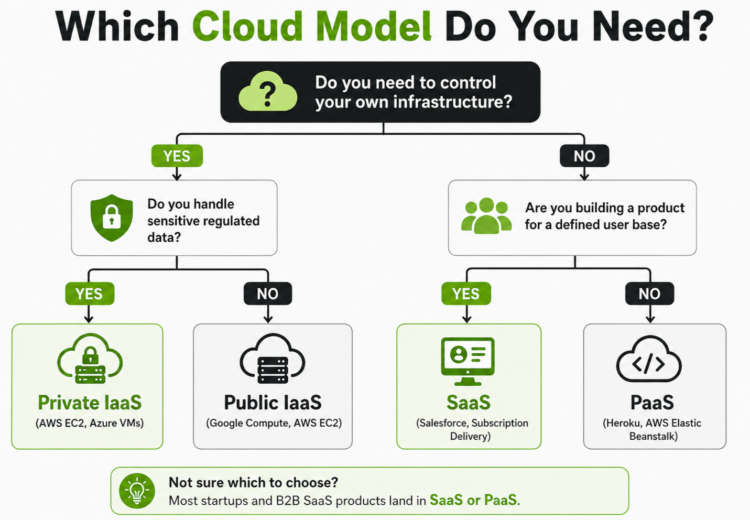
Decision tree to select the right cloud model—Private IaaS, Public IaaS, SaaS, or PaaS—based on control, data sensitivity, and use case.
Cloud deployment tells you where your app actually lives. This choice affects cost, security, compliance obligations, and how fast you can scale.
Table 3: Cloud Deployment Model Comparison
| Deployment Model | Who Controls It | Cost Profile | Security Level | Best Use Case |
| Public Cloud | Third-party provider (AWS, Azure, GCP) | Pay-as-you-go, lowest upfront | High (shared responsibility) | Startups, SMBs, SaaS products |
| Private Cloud | Your organization | High upfront, predictable OpEx | Highest | Healthcare, finance, and regulated industries |
| Hybrid Cloud | Split between public and private | Moderate, depends on workload split | High | Enterprises with legacy and new workloads |
| Multi Cloud | Multiple public providers | Variable, complex billing | High if managed properly | Avoiding vendor lock-in, resilience-first architecture |
For most of our B2B clients, hybrid cloud is the right answer. It gives you flexibility for new workloads while keeping sensitive data on private infrastructure.
No doubt, the benefits of cloud-based app development are real, but the numbers behind them matter more than the labels. Here is what the data actually shows.
Migrating to IaaS cuts carbon emissions by up to 84% and energy consumption by up to 64%. It also cuts your capital expenditure significantly.
Businesses no longer buy servers up front. They pay for what they use. That shift from CapEx to OpEx changes the financial structure of your product from day one.
Cloud platforms give development teams pre-built services: authentication, databases, storage, notifications, all out of the box. Your team builds product logic, not plumbing.
Cloud-native builds reach deployment 30 to 50% faster than on-premise equivalents when teams use managed services effectively. That speed advantage compounds with each product iteration.
If your app doubles its user base overnight, your infrastructure scales automatically. No hardware procurement cycle, no extended lead time, no emergency planning session. Your platform handles it.
Gartner projects that 75% of enterprise-generated data will be processed outside traditional data centers. Apps built for the cloud handle this shift without architectural rewrites.
94% of businesses that moved to the cloud reported an improved security posture afterward. The key phrase is “when done correctly.” Misconfiguration, not hacking, is the top cause of cloud breaches.
72% of organizations are now adopting generative AI. Cloud-native architecture is the prerequisite for integrating these services efficiently.
On-premise systems make AI integration significantly harder, slower, and more expensive. If AI capability is on your product roadmap, cloud-native is not optional; it is structural.
Talking about cloud benefits in theory is useful. Seeing how the world’s most recognized platforms built and scaled on cloud infrastructure makes the decision much easier to justify internally.
Spotify uses GCP for its recommendation engine, analyzing millions of data points to personalize user playlists. That engine, the one behind Discover Weekly and Daily Mixes, runs on Google’s BigQuery and ML infrastructure at a scale that would be cost-prohibitive on dedicated hardware.
If AI or personalization is central to your product’s value proposition, GCP’s data and ML tooling provides an infrastructure advantage that other platforms do not match.
Tinder:
Tinder is hosted on AWS cloud, using AWS Amplify to build and test mobile applications, MongoDB for its database, and Redis for caching and in-memory data processing.
Dating apps sit at the intersection of three of the hardest engineering problems in mobile: real-time location processing, AI-driven matching at scale, and low-latency messaging. All three require cloud-native architecture.
Uber Eats looks simple from the outside. You tap, food arrives. Behind that tap is one of the most technically demanding real-time logistics systems ever built, running entirely on GCP and AWS cloud infrastructure.
Food delivery, logistics, and on-demand service platforms are among the hardest apps to architect correctly. They require real-time geolocation, simultaneous multi-party coordination, AI-driven dispatch, and payment processing — all without a single point of failure.
None of this is achievable at scale on fixed infrastructure. The Uber Eats architecture is the reference model for any on-demand marketplace build.
You have mostly heard that the right platform depends on your needs. That is not advice. Here is what actually separates these three platforms for app development teams.
AWS vs. Azure vs. GCP — For Cloud App Development
| Factor | AWS | Microsoft Azure | Google Cloud (GCP) |
| Market Share (2026) | ~32% (largest) | ~22% | ~12% |
| Best Strength | Broadest service catalog, mature ecosystem | Microsoft product integration (Office 365, Active Directory) | AI/ML tools (Vertex AI, BigQuery), data workloads |
| Ideal For | Startups, SaaS products, high-scale infrastructure | Enterprises already running on Microsoft stack | AI-heavy apps, analytics platforms, data pipelines |
| Pricing Model | Pay-as-you-go plus Reserved Instances | Pay-as-you-go plus Azure Reservations | Sustained use discounts built into the base pricing |
| SMB Adoption Rate | 53% SMB adoption (Flexera 2026) | 29% SMB adoption | Growing rapidly |
| Standout Services | AWS Lambda, Elastic Beanstalk | Azure Functions, Azure Kubernetes Service | BigQuery, Cloud Run |
We treat platform selection as an architecture decision, not a brand preference. We default to AWS for most new B2B SaaS builds.
Azure becomes the better choice when the client’s enterprise environment already runs on Microsoft. Forcing a migration to AWS for its own sake adds cost, not value.
GCP earns its place when AI or data processing sits at the core of the product. If you are building an analytics platform or a product where ML inference matters, GCP’s tooling is genuinely superior.
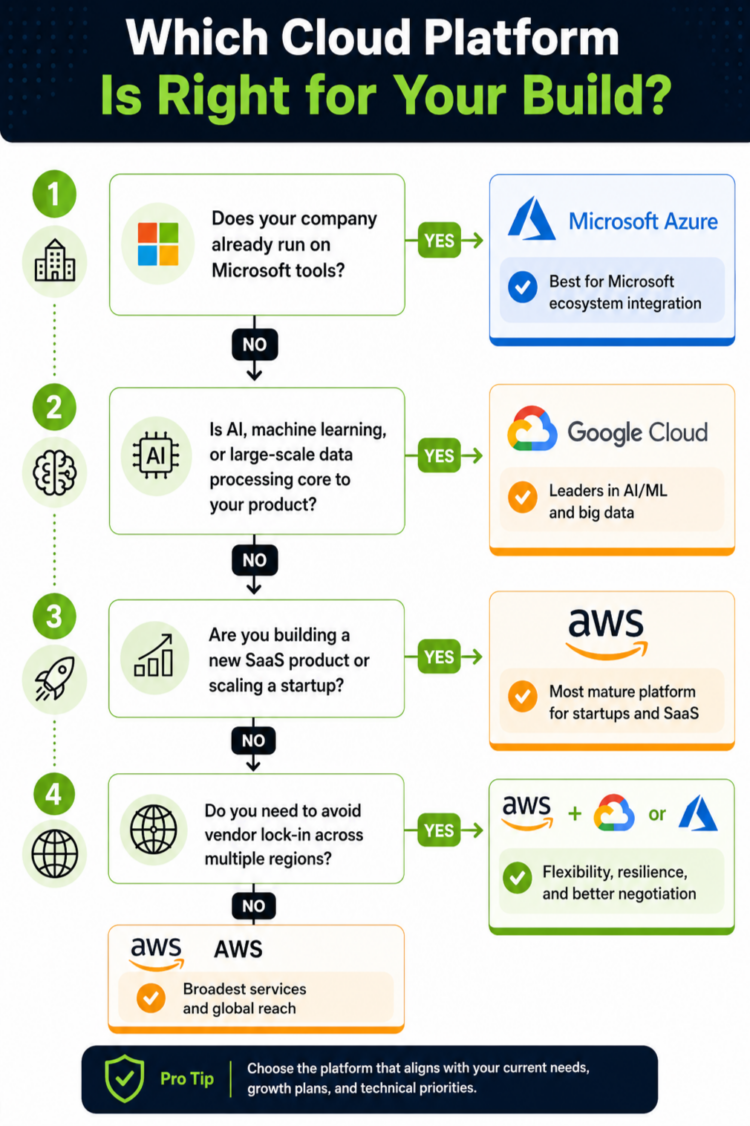
Decision guide to choose between Azure, Google Cloud, and AWS based on ecosystem, AI/ML needs, startup scaling, and vendor flexibility.
The development process for a cloud app has seven stages. What separates a clean build from a costly one is how seriously you treat Stage 1.
This phase produces your technical blueprint: what stack you use, how data flows, where security is enforced, and which cloud services replace custom code. It takes two to four weeks.
Teams that invest 20% of their total budget in discovery are three times more likely to stay on scope. Most budget overruns trace back to a skipped or rushed discovery phase.
Design is not aesthetic. It is product logic made visible. Your UX defines user flows, information hierarchy, and the paths to conversion or task completion.
Poor UX discovered late in development means rebuilding screens and rethinking backend logic. Catching it in the design phase costs a fraction of catching it in development.
Backend handles data processing, authentication, business logic, and API integrations. Frontend delivers the interface. These two tracks often run in parallel with daily sync points.
This is typically the largest cost center of the build. The architectural decisions made in Stage 1 determine how efficiently this stage runs.
This is where your chosen platform gets configured: compute instances, managed databases, storage buckets, CDN, and auto-scaling rules. Done right, this stage is invisible to end users.
Done poorly, it becomes the source of unexpected bills and performance problems at scale.
Unit tests, integration tests, load testing, and a dedicated security audit all happen before deployment. Skipping security testing here is where 85% of misconfiguration breaches originate.
Testing is not a cost-saving opportunity. It is the stage that determines whether your launch is clean or chaotic.
CI/CD (Continuous Integration and Continuous Deployment) automates your release process. Every code change gets tested and staged before going live. This is the operational backbone of any serious cloud product.
Teams without a CI/CD pipeline spend more time managing deployments manually and introduce more risk with every release.
The build does not end at launch. You need active monitoring for performance, cost, and security. Cloud waste currently averages 29% of cloud budgets, according to Flexera’s 2026 State of the Cloud Report.
63% of organizations now have dedicated FinOps teams. If you are not actively managing your cloud spend after launch, you are paying for resources you are not using
Cloud App Development Timeline by Complexity
| App Type | Stages Involved | Typical Timeline | Recommended Team Size |
| Simple MVP | Discovery, Design, Core Dev (single track), Deploy | 8 to 12 weeks | 3 to 5 people |
| Mid-complexity SaaS | All 7 stages, one full-stack team | 4 to 6 months | 5 to 9 people |
| Enterprise Platform | All 7 stages, parallel frontend and backend tracks | 6 to 14 months | 10 to 20+ people |
The honest range is $30,000 to $400,000+. The gap between those numbers is almost entirely explained by three things: complexity, team location, and architectural decisions.
Cloud App Development Cost by Type (2026)
| App Type | Complexity Profile | Estimated Cost Range | Typical Timeline |
| Simple MVP | Basic features, 1 to 2 integrations, single user type | $25,000 to $60,000 | 2 to 4 months |
| Mid-complexity SaaS | Multiple user roles, payment gateway, dashboards, APIs | $60,000 to $150,000 | 4 to 6 months |
| Enterprise Platform | Multi-tenant, compliance (HIPAA/GDPR/SOC 2), advanced analytics | $150,000 to $400,000+ | 6 to 14 months |
These are development costs only. The number most clients miss is what comes after launch. Year-one post-launch costs typically add 25 to 35% on top of the initial build.
Cloud waste is the hidden tax nobody plans for. Flexera’s 2026 data shows 29% of cloud budgets are wasted on idle or overprovisioned resources. At a market scale of $723 billion, that 29% represents roughly $210 billion in annual spend that generates no measurable return.
FinOps, the discipline of managing cloud costs with the same rigor as product development, is no longer optional for any cloud product at scale. 63% of organizations now have a dedicated FinOps team, up from 59% in 2025.
Cost Drivers Breakdown
| Cost Factor | Impact Level | What This Means in Practice |
| App complexity | High | Each additional feature category adds $5,000 to $30,000+ |
| Team location | High | US teams charge $100 to $300/hr vs. $30 to $80/hr in South Asia for comparable output |
| Cloud platform choice | Medium | AWS, Azure, and GCP pricing differences are most significant at scale, not at launch |
| Number of integrations | Medium | Each third-party API adds $1,500 to $8,000 in development plus ongoing subscription fees |
| Compliance requirements | High | HIPAA, GDPR, or SOC 2 certification adds $10,000 to $50,000+ in architecture and audit costs |
| Architecture type | High | Serverless architecture can reduce long-term operational costs by up to 35% vs. VM-based setups |
85% of organizations have experienced a cloud security incident caused by misconfiguration, not by sophisticated external attacks. The threat is largely self-inflicted.
Security built into the architecture from Stage 1 costs far less than security retrofitted after a breach. According to IBM’s Cost of a Data Breach Report 2024, the average cost of a cloud data breach is $3.86 million.
That number does not include reputational damage, customer churn, or regulatory penalties. For regulated industries, the total cost is significantly higher.
Compliance is not a one-time certification. It is an ongoing architecture discipline with a real annual cost. Most cost guides published by development vendors do not include this, which is a significant omission.
Cloud infrastructure is the right choice for most businesses building software products in 2026. It is not the right choice in three specific scenarios.
Your application has ultra-low-latency requirements — sub-5ms response times for real-time trading or industrial control systems — on-premise edge infrastructure often performs better than public cloud.
The industry operates under data sovereignty laws that prohibit data leaving a specific jurisdiction; a private on-premise or regional cloud setup may be mandatory, not optional.
Usage is completely flat and predictable with no scaling requirement at all; a dedicated server can sometimes cost less than cloud pay-as-you-go over a five-year horizon.
These are edge cases. If you are building a B2B software product, a SaaS platform, or an enterprise tool in 2026, cloud is almost certainly the right architecture. But knowing when it is not builds more credibility than pretending there are no exceptions.
The wrong development partner costs more than a higher quote from the right one. A rebuild always costs more than the original build.
At Code Brew Labs, every client engagement starts at the architecture level. Our team reviews your use case before a team is deployed or a line of code is written.
That is not a sales process. It is how you avoid building the wrong thing on the right infrastructure.
Partner Evaluation Criteria
| What to Evaluate | Green Flag | Red Flag |
| Architecture consultation | Senior architect involved before scoping begins | Sales rep sends a quote without asking a single technical question |
| Cost transparency | Itemized estimates that include post-launch costs | Single number with no phase breakdown |
| Platform independence | Platform-agnostic recommendation based on your use case | Default to one platform regardless of what you are building |
| Security approach | Security-by-design built into Stage 1 | We handle security at the end |
| Post-launch support | FinOps and optimization built into the engagement model | No discussion of post-launch cost planning |
| Team transparency | Named team members with defined roles | Generic “team of experts” with no specifics |
One more practical test: ask the vendor what they would NOT build in the cloud. A partner who claims cloud is right for every situation, for every client, at every scale, is not giving you advice. They are telling you what you want to hear.
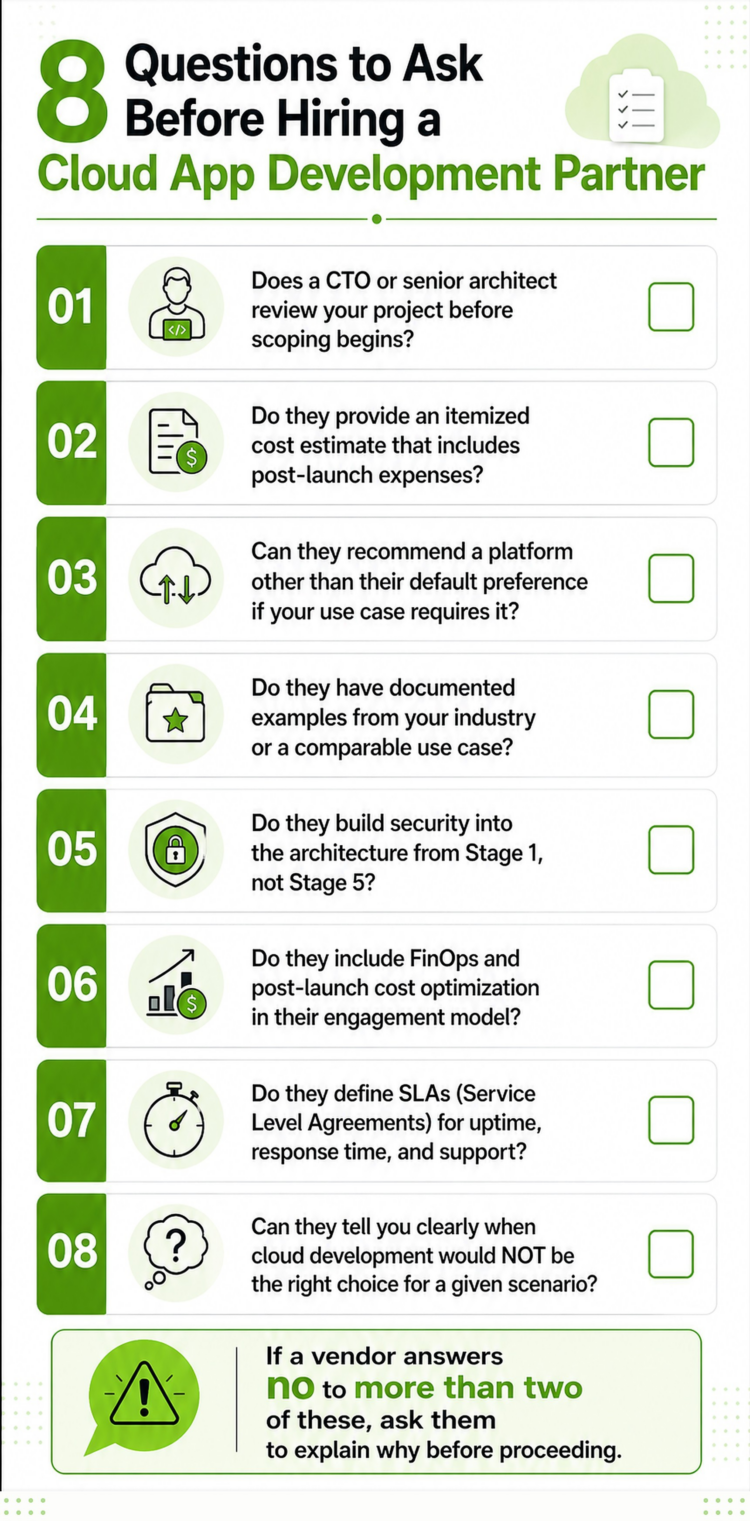
Checklist of key questions to assess a cloud development partner, including cost transparency, security, SLAs, and industry experience.
Q1: What is cloud-based app development?
Cloud-based app development is the process of building software that runs on remote servers and is accessed over the internet, rather than being installed on a local device. It includes cloud-native builds designed for the cloud from scratch and cloud-enabled builds, which are existing apps refactored for cloud infrastructure.
Q2: How much does cloud-based app development cost in 2026?
A simple MVP costs between $25,000 and $60,000. A mid-complexity SaaS platform runs $60,000 to $150,000. Enterprise-grade cloud apps with compliance requirements start at $150,000 and can exceed $400,000. Post-launch costs, including hosting, maintenance, and security, typically add 25 to 35% to the total Year 1 spend.
Q3: Which is better for cloud app development: AWS, Azure, or Google Cloud?
AWS suits most new SaaS products and startups due to its broad service catalog and ecosystem maturity. Azure is the better choice if your business already runs on Microsoft infrastructure. Google Cloud is strongest for AI-heavy or data-intensive applications. The right answer depends on your existing tech stack and what your product needs to do.
Q4: What is the difference between cloud-native and cloud-enabled apps?
Cloud-native apps are built from the ground up for cloud infrastructure, typically using microservices or serverless architecture. Cloud-enabled apps are existing applications that have been migrated or refactored to run on cloud servers. Cloud-native apps are easier to scale, more resilient under load, and cheaper to operate over the long term.
Q5: How long does cloud app development take?
A simple MVP takes 4 to 6 weeks. A mid-complexity SaaS product takes 4 to 6 months. Enterprise platforms with compliance requirements typically take 6 to 14 months. Timeline depends most on feature scope, the number of third-party integrations, and how much time the team invests in discovery and architecture planning at the outset.
Q6: What are the hidden costs of cloud app development?
The most commonly missed costs are: annual maintenance (15 to 25% of the initial build cost per year), cloud hosting that scales with usage, third-party API fees for payments, maps, and notifications, annual security audits, and compliance certification costs. Most vendors quote only the development cost. The post-launch layer is rarely disclosed upfront.
Q7: What is FinOps, and why does it matter for cloud apps?
FinOps is the practice of actively managing and optimizing cloud infrastructure costs with the same rigor you apply to product development. Flexera’s 2026 State of the Cloud Report found that 29% of cloud budgets are wasted on idle or overprovisioned resources. A FinOps discipline identifies waste and reallocates the budget. It is not optional for any cloud app operating at scale.
Q8: How secure are cloud-based applications?
Cloud applications can be highly secure, but 85% of cloud security incidents come from misconfigurations rather than external attacks. Security needs to be designed into the architecture from Stage 1, not added after deployment. The major cloud providers offer a strong baseline security infrastructure. Your implementation decisions determine your actual risk level, not the platform you choose.
Building in the cloud gives your product a structural advantage: lower infrastructure cost, faster iteration cycles, and the ability to scale without re-architecting from scratch. The decisions you make before writing line one of code determine whether you actually get those advantages.
Code Brew Labs’ process starts with the questions most vendors skip: what you are building, how it needs to scale, what it should actually cost, and which platform decisions will matter five years from now.
Book Your Architecture Strategy Call with Code Brew Labs


 Contact Us
Team Up With Us Today For An Unforgettable Service Experience











 Book Free Consultation