Artificial Intelligence isn’t just a tech buzzword anymore; it’s a foundational tool shaping the way startups disrupt markets and compete with legacy players. Whether you’re building a SaaS product, e-commerce platform, or a fintech app, AI software development can inject automation, predictive capabilities, and personalization into your services, helping you deliver smarter solutions at scale.
Table of Content
The democratization of AI tools, the rise of cloud computing, and the availability of open-source libraries have made AI more accessible than ever. Startups today can integrate AI without building everything from scratch. For instance, tools like ChatGPT, TensorFlow, or AWS SageMaker provide plug-and-play models or environments that eliminate the need for an in-house data science lab.
But the benefits go beyond convenience. AI empowers startups to:
This competitive edge isn’t optional anymore; it’s essential for survival in most modern industries.
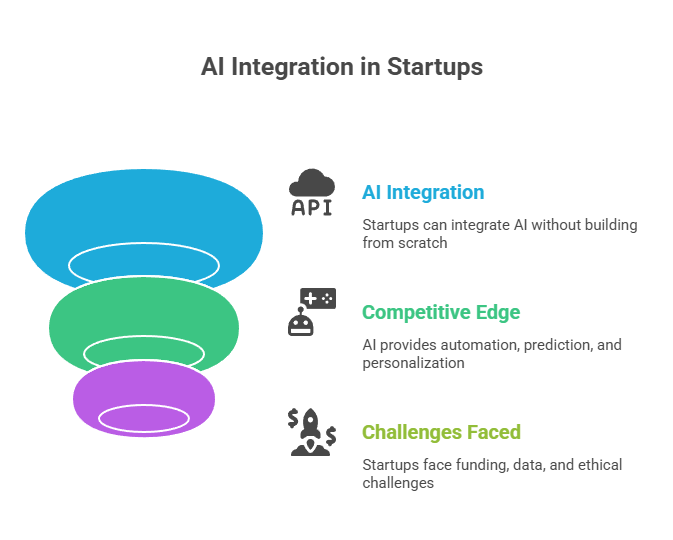
However, building AI solutions isn’t all sunshine and machine learning. For startups, the road to AI integration can be riddled with obstacles:
In short, AI app development can be a game-changer or a budget burner, depending on how strategically it’s approached. That’s why this step-by-step guide is crucial; it breaks down the complex AI development journey into digestible steps tailored for startups.
Before writing a single line of code or downloading a dataset, you need to understand the problem you’re solving. Too many startups jump into AI because it “sounds cool” or “gets VC attention.” But without a real-world problem, AI is just expensive fluff.
Start with market research. Conduct surveys, interview potential users, or analyze online communities like Reddit and Quora. Try to answer:
Real pain points lead to viable AI solutions. For example, in e-commerce, if customers frequently abandon carts, an AI system that predicts and intervenes with offers could reduce churn. That’s a real business use case.
Once you identify a problem, assess whether AI is truly the best solution. AI is great at:
Let’s say you’re a startup building a logistics platform. AI could help optimize delivery routes in real time based on weather and traffic conditions. That’s a clear alignment with your goal: faster, more efficient deliveries.
To avoid “AI for AI’s sake,” your proposed AI solution must tie directly to KPIs like:
Set a clear baseline of where your business is today, and define how AI will drive it forward.
Once the problem is clear, it’s time to narrow the scope. Startups often make the mistake of trying to “boil the ocean” by developing a mega AI system that does too much. Instead, pick a single, high-impact use case.
Some criteria to help prioritize use cases:
Here are a few examples:
Choose the use case with a balance of business value and implementation feasibility. Think MVP, Minimum Viable Product, not a fully-fledged AI utopia.
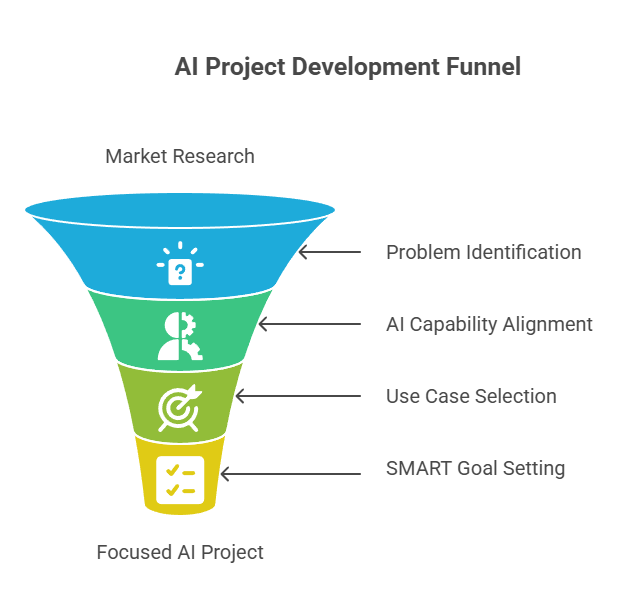
With a use case selected, it’s time to define objectives using the SMART framework:
For example, instead of saying, “We want to improve customer service,” say, “We aim to reduce support ticket response times by 30% in 3 months using an NLP-powered chatbot.”
SMART goals keep your AI project focused and trackable, and they help secure buy-in from stakeholders or investors.
Staffing is often the trickiest part for startups. Hiring full-time AI specialists can be expensive, but relying solely on freelancers can lead to inconsistency.
In-house teams provide more control and long-term stability but come with higher overhead costs. You’ll likely need:
Outsourcing, on the other hand, offers speed and flexibility. You can hire:
A hybrid model often works best to retain core strategic control internally while outsourcing specialized tasks like model training or data annotation.
At the bare minimum, your AI developers should include:
Larger teams may also include:
Think of it like assembling a heist crew; you need the right mix of brains, builders, and operators to pull it off.
Picking the right tech stack can make or break your AI project, especially when resources are tight and timelines are short. This step isn’t just about what’s popular; it’s about choosing tools that align with your team’s skills, project complexity, and long-term maintainability.
Let’s talk programming languages first.
Frameworks, on the other hand, help you avoid reinventing the wheel:
When choosing, consider:
Start simple. Don’t pick tools just because they’re trending. Go for what helps you build a stable, working MVP fast.
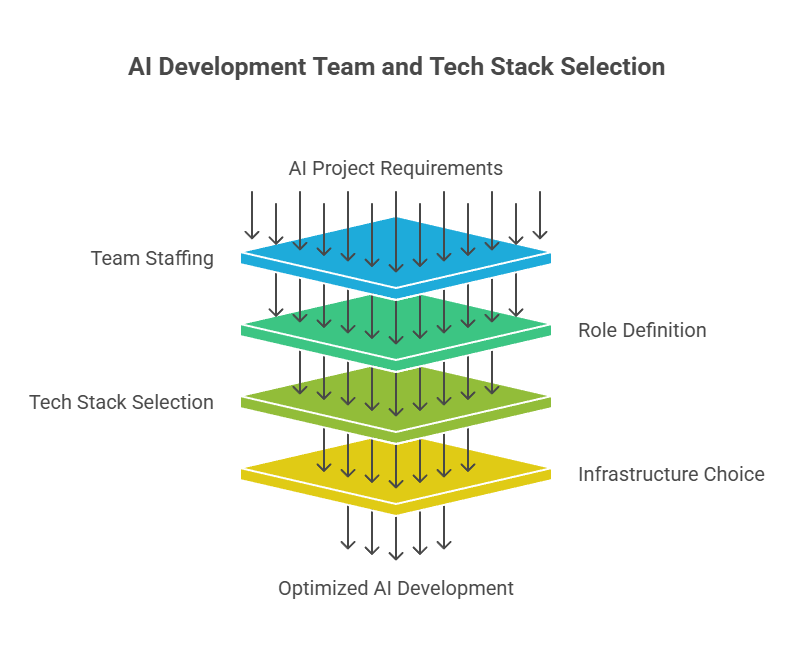
Next up: where should your AI run? On the cloud or your servers?
Cloud services like AWS, Google Cloud, and Azure dominate because they’re flexible, scalable, and let you pay as you go. You get access to GPUs/TPUs, pre-built AI APIs, and powerful DevOps tools. This is gold for startups that don’t want to manage hardware or invest in infrastructure upfront.
Cloud advantages:
But the cloud isn’t perfect. It comes with:
On-premise infrastructure, on the other hand, gives you total control. You manage your servers and hardware. This can be ideal for startups dealing with:
Downsides of on-premise:
Many startups start with the cloud to stay lean and only shift to on-prem once they hit scale or specific compliance needs. Hybrid models are also possible to use cloud for model training and on-prem for inference if needed.
The key: choose what gets your MVP running fast while leaving room for future optimization.
Think of data as fuel for your AI engine. No matter how powerful your algorithm is, if you feed it bad fuel, it won’t run properly. For startups, the quality and relevance of your data determine whether your AI model becomes a competitive advantage or an expensive flop.
Many make the mistake of trying to gather too much data too quickly. Instead, focus on acquiring the right data that directly impacts your AI’s ability to solve the problem.
Good data is:
Let’s say you’re building an AI to predict loan defaults. You don’t need a massive data lake of all customer behavior. You need financial history, repayment timelines, employment details, and perhaps some credit scores. Everything else is noise.
Startups also often rely on public datasets (like Kaggle or UCI repositories) for initial prototyping. These are fine for early experiments, but can’t replace real-world, contextual data for production systems.
Always remember: garbage in, garbage out. You need a clean dataset, not just for model accuracy, but also for trust. Imagine deploying a recommendation engine that suggests irrelevant products because of mislabeled data. That’s a quick way to lose users.
Once you’ve collected the right data, the next step is to label and manage it effectively, especially if you’re building a supervised learning model.
Labeling means giving your data a meaning:
Labeling can be:
For startups, manual labeling is often necessary early on, even if it’s a pain. It teaches you a lot about your data, helps you build baseline models, and clarifies edge cases.
You’ll also need to manage this data:
Tools like Labelbox, SuperAnnotate, or even Roboflow can simplify annotation workflows. Combine these with tools like DVC (Data Version Control) or MLflow for better tracking and reproducibility.
In short, treat your data like code; it needs structure, review, and maintenance.
You’ve got the data. Now it’s time to pick or build your model. But here’s the big question: Should you train your model from scratch or use a pre-trained one?
Pre-trained models are already trained on massive datasets and can be fine-tuned to your task:
Benefits:
Limitations:
Custom models, on the other hand, give you full control. You build them from scratch using frameworks like TensorFlow or PyTorch, tuned specifically to your data and task.
Choose custom if:
Startups often begin with pre-trained models for MVPs and gradually move to custom models as the product matures.
Now the real AI magic begins: training your model. But before you click that “Train” button, you need a solid process in place.
Tuning a model isn’t just trial and error. It’s a structured process. Tools like Optuna, Weights & Biases, and TensorBoard can help track experiments and visualize results.
Finally, once your model performs well on test data, package it. Serialize with formats like Pickle, ONNX, or TensorFlow SavedModel depending on your deployment needs.
And remember, training is not a one-time event. Your model will need to evolve as your users grow and behavior changes.
Once your AI model is trained and validated, it’s time to make it useful by integrating it into your product. This step is often underestimated, but it’s where your AI shifts from a theoretical concept to a real, user-facing feature.
APIs (Application Programming Interfaces) are the backbone of AI integration. They allow your model to communicate with other components of your application. For example:
Popular tools to build and serve APIs include:
When building APIs:
Next comes the front-end. Even the best AI doesn’t matter if users can’t interact with it smoothly. Whether you’re building a chatbot interface, a dashboard for insights, or a real-time image detection tool, the UI must:
Use tools like React, Vue, or Flutter for dynamic and responsive interfaces. Make sure your design reflects that AI features are helpful, not creepy or invasive.
Lastly, always provide fallbacks. If your AI fails or produces uncertain results, the system should default to a standard flow; don’t leave your users hanging.
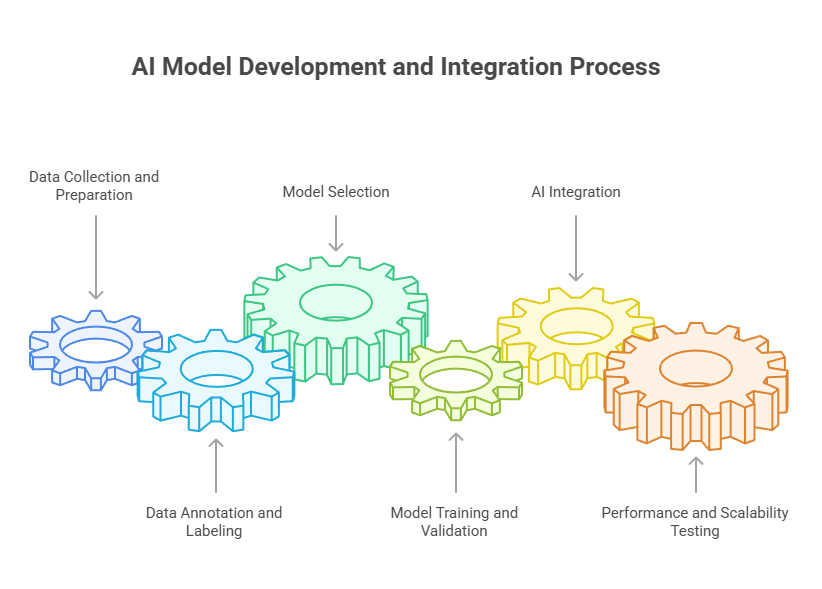
Your AI feature might work in development, but will it hold up under real-world stress?
Performance testing ensures your model delivers fast, consistent, and accurate results under various conditions. Here’s how to test like a pro:
Scalability is just as crucial. AI workloads can spike suddenly, such as during Black Friday sales or viral product launches. Prepare by:
If your AI features can’t handle growth, your startup will lose trust fast. Prioritize performance testing like you would product design—it’s part of the user experience.
Handling user data means you’re stepping into a minefield of privacy laws. Regulations like GDPR (EU), CCPA (California), HIPAA (US Healthcare), and others dictate what data you can collect, how you store it, and who can access it.
Startups often overlook this until it’s too late, when they’re hit with fines or legal warnings. Avoid that mess by following these steps:
Also, draft a Data Processing Agreement (DPA) if you’re using third-party services. This ensures all parties involved handle data responsibly.
Work with legal advisors, early compliance should be built into your product, not tacked on after launch.
AI isn’t neutral. If your training data has biases, your model will reflect them, and possibly amplify them. This can lead to discrimination, reputational damage, or even legal consequences.
Let’s say your startup is building an AI for hiring. If your dataset favors one gender or race based on historical trends, your model could perpetuate that bias.
Here’s how to build ethical AI:
Ethics aren’t just PR—they’re product design. Build AI that earns trust, not lawsuits.
Deploying AI is not like shipping a static app. Your models evolve, your data changes, and your infrastructure must adapt. That’s where CI/CD for ML (MLOps) comes in.
CI/CD automates:
Set up pipelines with:
Benefits of CI/CD:
For AI, you’ll also want Continuous Training (CT), retraining models automatically when new data arrives.
Think of MLOps as DevOps for machine learning; without it, you’re flying blind.
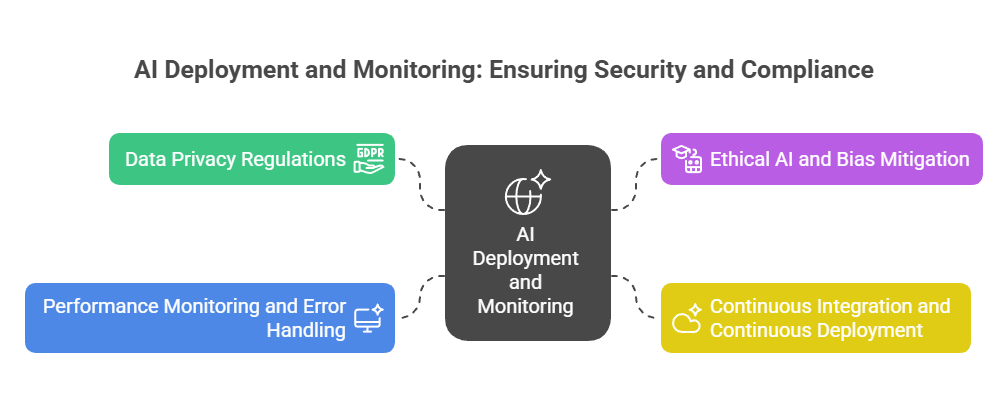
AI in production needs babysitting. Just because your model performs well in the lab doesn’t mean it’ll behave in the wild.
Monitor:
Use tools like:
Also, build in fallbacks:
You don’t want to wake up one day and find your model recommending nonsense or misclassifying every input. Monitoring is your early warning system.
Your AI might run well today, but what about tomorrow when you gain 10,000 users overnight?
Auto-scaling lets your system adjust based on real-time demand. Use services like:
Set thresholds for:
With Kubernetes, you can define Horizontal Pod Autoscaling (HPA) to spin up more containers as needed.
Make sure your AI model supports:
Auto-scaling ensures your users get consistent performance, whether it’s 10 requests or 10,000 per second.
AI models are not “set it and forget it.” They degrade over time. That’s why you need feedback loops, systems that feed real-world results back into model improvement.
Steps to set up a feedback loop:
This leads to continuous learning, where your model evolves just like your business.
Tools to automate this:
Remember, your users are the best source of truth. Listen, learn, retrain, and repeat.
One of the most damaging mistakes startups make when diving into AI is underestimating the importance of high-quality data. There’s a common misconception that more data is always better, but quantity without quality is just noise. Even the most advanced AI models are only as good as the data they’re trained on.
Here’s what usually goes wrong:
When startups skip the data validation step, they often end up with a model that works great in the lab but fails miserably in the real world. This results in:
Solution? Make data quality a priority from day one. Create a dedicated process for:
Invest in tools like Great Expectations or Monte Carlo Data for automated data quality checks. And remember: a small, clean dataset beats a massive, messy one every time.
Another classic pitfall is overengineering the MVP (Minimum Viable Product). Startups often fall into the trap of thinking their first AI solution has to be perfect, complex, or scalable to millions on day one. That mindset kills speed and flexibility two things every startup desperately needs.
Overengineering might look like:
Here’s the truth: Your first version will probably be wrong anyway. That’s not a problem, it’s the point. The goal of the first release is to learn, not to impress.
Instead of obsessing over complexity, focus on:
Think of it this way: don’t build a spaceship when you’re still trying to prove you can ride a bike. Keep it simple, get it out, and grow from there.
Low-code and no-code platforms are reshaping how startups approach AI development. Traditionally, AI projects required a team of data scientists, ML engineers, and DevOps specialists. But now? Founders with no technical background can prototype AI features using drag-and-drop tools.
Examples of these platforms include:
These tools offer:
For startups, this means:
However, there are trade-offs:
Still, for MVPs or internal tools, no-code AI can be a game-changer. It empowers founders to experiment and validate ideas before investing in a full-scale development team.
Another trend gaining massive traction is AI-as-a-Service (AIaaS). Much like SaaS transformed software delivery, AIaaS platforms allow startups to plug into ready-to-use AI functionalities via APIs, with no training, tuning, or infrastructure setup required.
Top AIaaS providers include:
Use cases for startups:
Why it matters:
In 2025 and beyond, expect even more specialized AIaaS platforms like AI for real estate analysis, legal contracts, health diagnostics, and more.
For startups, AIaaS is the fast lane to innovation.
Artificial Intelligence presents a powerful opportunity for startups to increase efficiency, deliver smarter customer experiences, and unlock new, innovative business paths. However, AI software development isn’t a one-click solution or a guaranteed win. To truly benefit from AI, startups must adopt a deliberate and structured approach, grounded in strategic planning, clean and relevant data, and a clear alignment between technical solutions and business needs.
Along the way, we pointed out frequent mistakes like neglecting data quality or creating overly complex early versions and explored emerging trends, including no-code AI platforms and AI-as-a-Service offerings that lower the barrier to entry. Start lean, build fast, and adapt based on real user feedback. As technology continues to evolve, startups that approach AI with intentionality and integrity will have the greatest chance to lead and shape the future.


 Contact Us
Team Up With Us Today For An Unforgettable Service Experience












 Book Free Consultation